Covers Manual 1 pp. 59–64.
Playing a game#
This chapter is the player's side of RPG Maker: starting a game from GAME, walking the maps, the field menu, messages, shops and inns, saving, the world map, battles, Game Over and the ending. It ends with the tools Test Play adds for the maker. Every RPG Maker game plays with the same menus and screens; a game can rename the words on them (Arc Arath, in many of the pictures, says Spells, Techs and GP), but not change how they work.
The GAME menu#
GAME, on RPG Maker's top menu, opens three entries. ○ goes back.
| Entry | Screen | What it does |
|---|---|---|
| Continue | Load Game Data | Carry on from a game save on a card. |
| Start | Start Game | Start a game from the beginning, from its System Data on a card. |
| Sample | Start Sample Game | Play the sample game from the disc. |
Continue#
Continue lists the game saves on the memory cards. Each card has 15 save slots, A to O, shared by every game, two to a screen. A slot shows the game's title, the scenario it was saved in, up to four party members with their levels, the blocks it uses and the play time. Empty slots read No Data. Pick one with × and the game goes on from where it was saved.
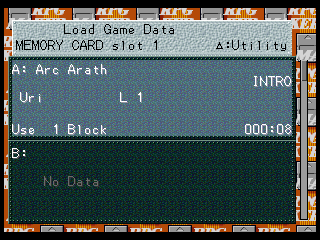
A save needs the game's System Data and the saved scenario on a card as well; Memory cards and saves explains what the game looks for.
Start#
Start lists the System Data files on the cards, three to a screen, with each game's name, its maker, its blocks and its play time. Choose one and the game checks the cards for what it needs: the first scenario that the System names, then any Anime Maker pictures it imports (monsters, then characters, then the title picture).
- If the scenario is missing, "No Scenario Data found." asks you to put in the card that holds it. A missing System gives "No System Data found." the same way.
- A missing picture gives "NAME was not Found!", and any button goes on without it.
- Start never asks for a password. A password only stops the game from being opened in the editor (Memory cards and saves).
A new game starts with the clock at 0:00:00 and the Start Party at the scenario's Start Point, facing down. There is no built-in title screen: what a player sees first is whatever the first map's events show, usually a title from the Display Title command.
Sample#
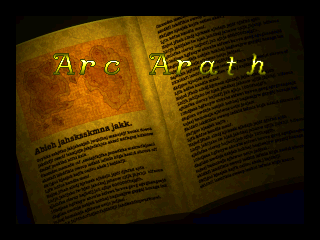
Sample shows the sample game, the System Gobli with its scenario Gobli's Adventure, and a short description. × loads both from the disc and starts it. If there are unsaved changes in EDIT, it warns first that they won't be kept.
The sample can be saved like any game, and Continue picks it up again, reading the sample's data from the disc (Getting started).
Walking#
The d-pad walks, × checks, □ opens the menu. The party walks one tile at a time: a step takes 12 frames, a fifth of a second. The other members follow in the leader's footsteps. With two directions held, ↑ wins over ↓, ↓ over ←, and ← over →, so there is no diagonal walking.
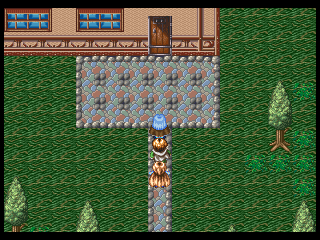
× is Check: it talks to the person in front of the leader or searches what is there, if an event is waiting for it. Walking into a wall or a person plays the bump sound the game chose in Configuration. Other events start by being touched, or by themselves; Events has the start methods.
Poison costs every poisoned member 1 HP a step, with a red flash and a sound, but never takes the last HP: poison can't kill outside battle.
Random battles happen only on dungeon maps (towns, houses, dungeons), never on the world map. The first two steps after a battle or a change of map are always safe. How often battles come, and which monsters, is set in Monster Appearance and explained in How battles work.
The field menu#
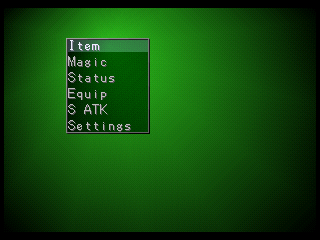
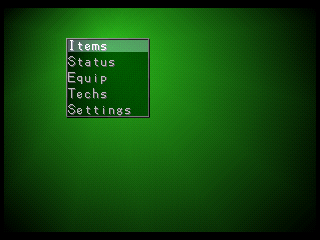
□ opens the field menu: the map dims under a spotlight, and the windows fly in. ○ closes it. Its entries depend on the game:
| Entry | Shown when | Does |
|---|---|---|
| Item | always | use, sort and drop items (below) |
| Magic | the game's Game System has magic on | cast a spell in the field |
| Status | always | the party's levels, HP, MP and stats; in a dungeon, swap the party order |
| Equip | any equipment slot is in use | change equipment |
| S ATK | Gameplay Edit's Special Attack and the Game System's Skill are on | look at the special attacks |
| Settings | always | the player's options |
| Quick Save | in Test Play only | save to memory (Test Play) |
| Save | on a world map only | save the game to a card (Saving) |
Item#
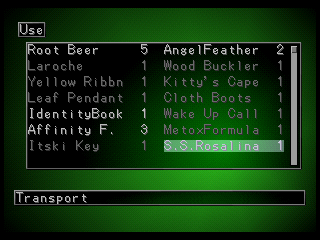
The Item screen opens on the bag. Above it a bar reads Use, Org, Drop; ○ moves from the list to the bar.
- Use uses the item on a member, or on the whole party for an item that works on all. The member rows show the HP and MP, and grey the members the item would do nothing for.
- Org sorts the bag. Each × on Org moves to the next order: Name, Sort (by type: weapons, armour, …), Cure (healing first, then field items, then attacks) and Attack (attacks first). Sorting is also the only way to close the gaps that used-up items leave.
- Drop throws away one of the item, without asking.
Items can break. An item is used up by chance, from never to always, as its Break setting says (The database); one that survives stays in the bag.
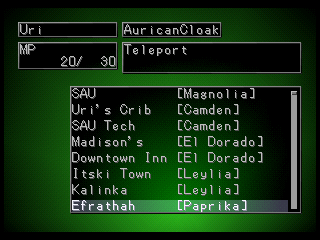
Some items do their work in the field rather than on a member:
| Item effect | In the field |
|---|---|
| Teleport | Lists the towns already visited, on every world map; × on one takes the party there. Only on a world map. |
| Escape Dungeon | Takes the party out to the world map, on the last town it entered. Only in a dungeon, and not where an event forbids it. |
| Encounter Down | 30 more steps without a random battle. Only in a dungeon. |
| Check | Picks an item from the bag and shows its details: price, whether it breaks, whether it is cursed, its class and the spell it casts. |
Magic and S ATK#
Magic picks a member, then a spell to cast in the field: healing, curing, Teleport and the like. Spells meant for battle are grey. Casting costs MP, as in battle. The entry shows only while the game has magic switched on in its Game System, which events can change.
S ATK shows each member's special attacks. It is only for looking: special attacks are used in battle.
Status#
Status shows the whole party at once: the names, each member's skill, level, HP and MP, and every stat with the equipment counted in.
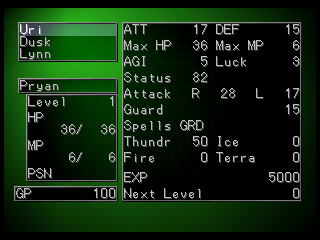 12345
- 1 The party the member under the cursor is shown in the other windows
- 2 Skill the member's skill
- 3 Level, HP, MP and the status tags: here PSN, poisoned
- 4 Gold under the game's name for it (Arc Arath: GP)
- 5 Stats with equipment counted in; Arc Arath's own names for the classes (Thundr, Ice, Fire, Terra)
The status tags after a name are PSN (poisoned), PAR (paralysed), PET (petrified) and CRS (wearing cursed equipment). In a dungeon, × on two members swaps them in the party order; on the world map Status only shows.
Equip#
Equip takes three steps: a member, a slot, then an item for it, with the member's stats beside them. A game can switch off any of the six slots (Head, Body, the two hands and two accessories), and the screen then offers only the others.
Settings#
Settings holds the player's choices, kept in each save:
| Option | Choices | What it changes |
|---|---|---|
| Cursor Speed | a slider, Slow to Fast | how fast a held direction moves the menu cursors |
| Sound | Stereo, Mono | the sound output |
| Battle Message Speed | Need to Confirmed, Slow, Normal, Fast, No Display | how long battle messages stay; Need to Confirmed waits for a button |
| Start Battle | Auto, Manual | Auto starts every random battle on Auto (event battles never) |
| Plan | a page | how each member fights on Auto, as in battle |
| BG color | Red, Green, Blue | the colour of the menus' spotlight backdrop |
Save#
On a world map, the menu ends with Save. It opens the same save screen as a Save Point (below). In towns and dungeons only a Save Point saves.
Messages and choices#
Events talk to the player in five kinds of message:
| Kind | Looks like | Moving on |
|---|---|---|
| Normal window | a window at the bottom, up to three lines a page, typed out letter by letter at the game's message speed | any button or direction turns the page; holding a direction shows the page at once |
| Main Character balloon | a speech balloon over the leader, one line | as Normal |
| Event balloon | a balloon over the event that speaks | as Normal |
| Message 1 | lines rolling up the screen, as in credits | a direction speeds it |
| Message 2 | a dark band across the screen, up to three lines a page, fading in and out | as Normal |
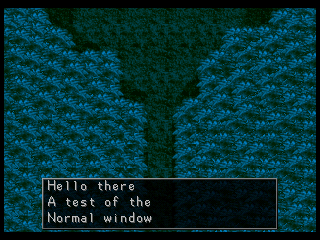
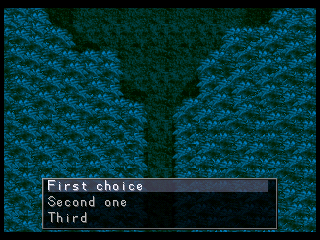
Choices come in two forms. A 2 or 3 Message choice lists its answers in a Normal window with a pulsing highlight. A Yes/No choice opens a small window at the top right. × answers.
How the windows are drawn and timed is in Graphics; the commands that make them are in Events.
Shops, inns and save points#
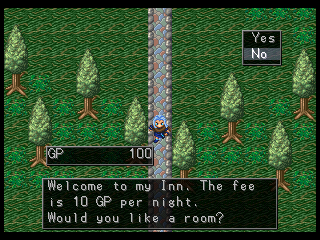
Shops, inns and Save Points are event commands a maker places on a person or a counter. They open over the same dimmed spotlight as the field menu. Their Yes/No questions open on No, so a stray × buys nothing.
| Event | What the player does | Needs |
|---|---|---|
| Inn | pay for a night: HP and MP back for the whole party | the game uses gold |
| Item Shop | buy up to eight kinds of item; sell at half price | the game uses gold |
| Skills Selection Shop | change a member's skill | the game uses skills |
| Trade Shop | swap an item for another | — |
| Save Point | save the game on a card | — |
Inns#
The innkeeper names the price for the night and shows your gold. Yes fades the screen out over the Inn tune and back in with every member's HP and MP full, the fallen too. An inn cures no status: poison, paralysis and petrification stay.
Item shops#
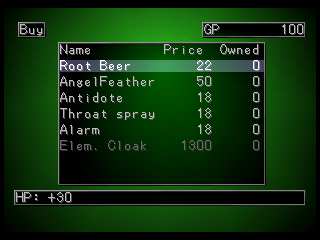
Buy lists up to eight items with their prices; a quantity window shows the price, how many, the total and what will be left. Sell lists what the party carries and pays half the price. Items the maker marked unsellable don't show, and equipped items are invisible to the shop, so they can't be sold by mistake.
Skill and trade shops#
A Skill shop asks who will change skill, then lists the skills on offer and asks "Are you sure?". A Trade shop swaps an item you carry for one of its own: you get half of what yours is worth, divided by the price of what you want, rounded down, and never more than 99 of a kind.
Saving#
A Save Point event, or Save on the world map's menu, opens Save Game Data. The screen fades, and the card's 15 slots show as on Continue. Choose a slot:
- an empty one shows Create New Data: × saves there;
- a full one asks Overwrite or Cancel;
- a card without room shows Vacant block is less than required.
A game save takes 1 block. "Access in Progress" shows while it writes; don't remove the card. △ opens the card Utility, for making room. Memory cards and saves has the details.
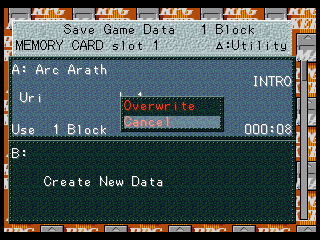 12345678
- 1 The card and slot Save Game Data, 1 block; which card; △ for the Utility
- 2 Game the game's title
- 3 Scenario where the save was made
- 4 Size a game save is always 1 block
- 5 Play time hours and minutes
- 6 Overwrite or Cancel asked for a slot that holds a save
- 7 An empty slot Create New Data
- 8 Scroll bar 15 slots, A to O
The world map#
The world map works unlike the rest. The party stands on a town, and a cursor moves instead, free across the map, with the camera following it. ○ brings the cursor back to the party. There are no random battles on a world map.
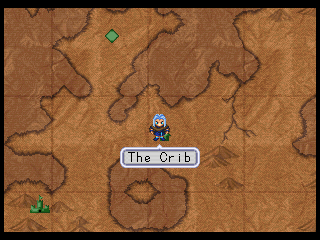
× on the cursor does one of four things:
- on the party's own town: enter it (a buzz if the town leads nowhere);
- on another town joined to this one by an open path: walk there along the path;
- on another town with no open path, with a Blimp in the bag: fly there, in a short hop;
- otherwise the buzzer: the town can't be reached yet.
Paths open and close by switches, and towns can stay hidden until a switch shows them, so the world grows as the story goes on. With a Boat in the bag, the party is drawn in a boat where a path crosses the sea. Field Edit explains how makers set this up.
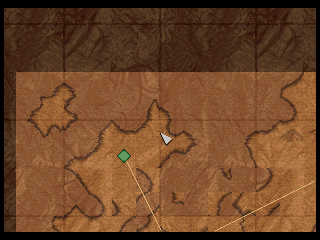
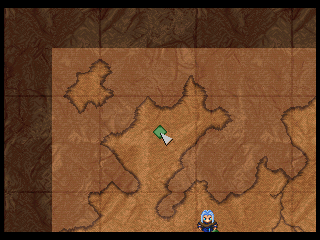
□ on the world map opens the field menu, with Save at its end.
Battles#
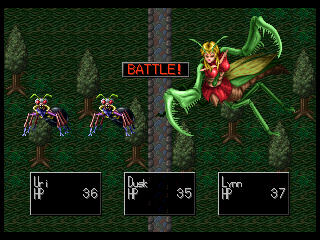
A battle opens with BATTLE! while the monsters drop in, over the map where it started. Now and then the party gets First Attack! (the monsters lose the first round), or the monsters an AMBUSH! (the party loses it). Event battles have neither (How battles work).
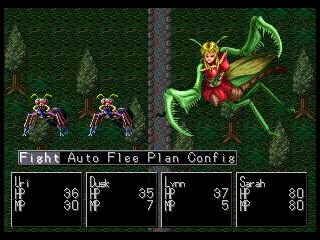
The party menu comes first each round. ◀ and ▶ move along it, and ○ does nothing here.
| Entry | Does |
|---|---|
| Fight | Give each member a command for the round. |
| Auto | Let the party fight on its own, round after round, by each member's Plan. Hold ○ to stop it. |
| Flee | Try to run. Event battles can't be fled. |
| Plan | Set how each member fights on Auto. |
| Config | Battle Message Speed and Start Battle, as in Settings. |
Fight then asks each member in turn: ATK (attack), GRD (guard), Item, Equip (use the magic of something worn), Magic and S ATK, the last four under the game's own names. A command the member can't use is grey. ○ goes back to the member before.
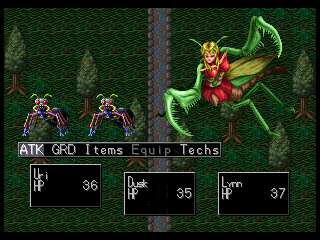
The party windows under the battle show each member's HP and MP. HP turns yellow when it runs low, and the name red when the member falls. Status tags show what ails a member: DTH fallen, PET petrified, PAR paralysed, POS poisoned, SLP asleep, CON confused, SIL silenced.
Win, and the party takes the monsters' experience, gold and any item they drop, to a victory tune. Everything about how a battle is decided, from the turn order to damage, the monsters' AI and the odds of fleeing, is in How battles work.
Game Over#
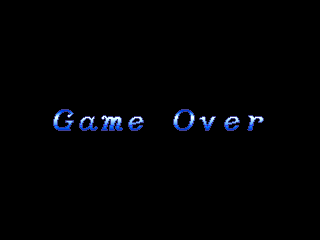
A lost battle ends the game, unless the battle was an event's that checks for a loss and carries on. Game Over fades in, in blue, over black; × or START clears it, and the game starts again from the last save, or the last scenario change if that came later.
The ending#
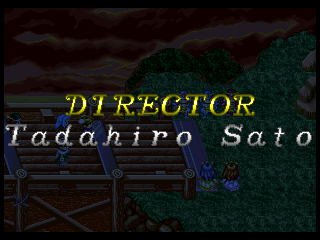
A game ends with its Ending event command, and the ending is the credits. They roll in four parts:
- ORIGINAL GAME STAFF, with the four staff titles and names the maker typed in Set System Data;
- the staff of RPG Tsukuru 3 at ASCII;
- RPG MAKER STAFF, the people who made the US version at Agetec;
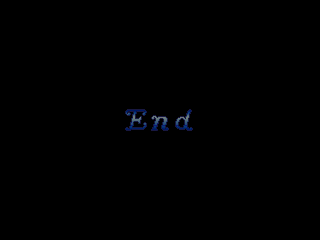
- End, which fades in and stays on the screen for good. Only a reset leaves it.
A game can show up to 20 snapshots during the credits, pictures of the game taken by the Snapshot event command along the way. Each is shown whole for a moment, then dimmed under the rolling names. The credits take about four minutes.
Test Play#
Test Play, in the EDIT menu, plays the game in memory without saving it first. It plays as GAME does, with some tools added. The ways in, Resume, Continue and Start, are in Getting started.
On the map:
- Hold ○ to walk through walls, people and objects (only the map's edge stops you). While ○ is held, no random battle starts.
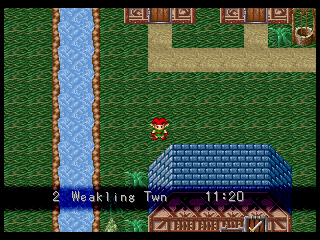
- Hold START on a dungeon to see a banner with the map's number, its name and the leader's position, for placing events.
- Hold L1+R1+START+SELECT to quit Test Play. It works on the map, not with the menu open or while a card is being read or written.
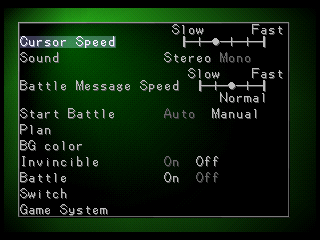
In the menu, Settings gains four rows, and a new Quick Save entry appears:
| Entry | Does |
|---|---|
| Invincible | On: no member's HP drops below 1, and petrification and death fail. |
| Battle | Off: no random battles. |
| Switch | The Game Switch page: all 500 switches, 100 a page, lit when on. × flips one; L1 and R1 turn the page. |
| Game System | Shows which of the game's systems are on (Magic, Level, each equipment slot, Skill, gold, Monster). Look only. |
| Quick Save | Saves to memory at once, and says "Completed". Resume picks it up. |
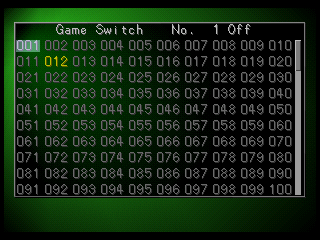
A Quick Save lives only in memory. It is lost when the console is switched off, and Continue can't load it; only Resume can. Saves made in Test Play are test saves ("Save Test Data"), kept apart from real game saves: Test Play's Continue reads them, GAME's Continue doesn't.