Covers Manual 1 pp. 17–42.
The database#
The database is the five lists a game's battles are made of: magic, items, characters, skills and monsters. Each has its own editor under EDIT → Edit Data, and all five work the same way. This page walks through the shared controls first, then each editor field by field, with what every setting does when the game is played. The formulas behind the numbers are on How battles work. Manual 1 pp. 17–42
| Editor | Numbers | Memory a record takes | Counter | Arc Arath uses | The sample game uses |
|---|---|---|---|---|---|
| Magic Edit | 1–230 | 40 bytes | MAG | 190 | 28 |
| Item Edit | 1–250 | 24 bytes | ITM | 202 | 52 |
| Character Edit | 1–15 | 260 bytes | CHA | 15 | 12 |
| Skill Edit | 1–15 | 52 bytes | SKI | 15 | 8 |
| Monster Edit | 1–250 | 52 bytes | MON | 142 | 35 |
The editors' names on the screen come from Parameter Name (System Data). A game that renames Magic and Item renames these editors too: Arc Arath, whose screens fill this page, calls them Spells Edit and Items Edit, calls S ATK Techs and M DEF Status, and names the four magic classes Thundr, Ice, Fire and Terra. The rest of this page uses the default names. Edit Data lists the Character editor as Main Characters; its screen says Character Edit.
How the five fit together#
The lists point at one another by number. A character starts with a skill and some items; an item can carry a magic; a skill teaches S ATKs; a monster casts magic and drops an item. Magic classes tie magic, weapons, accessories and monsters together.
Plan the numbers before you fill them. Nothing in the program follows a record when it moves (below), so a sensible order from the start saves trouble: healing magic together, weapons by strength, monsters by area.
Working in the editors#
The top menu and the counters#
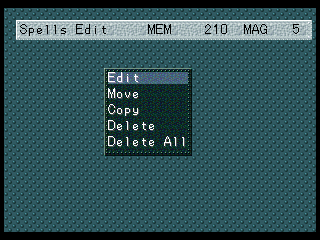
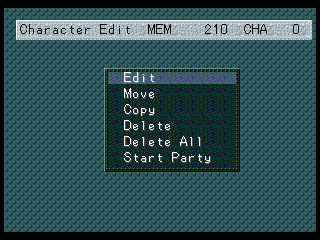
Each editor opens on a top menu: Edit, Move, Copy, Delete and Delete All. Character Edit adds Start Party. With an empty list, everything below Edit is grey and only buzzes. The cursor comes back to the last command you used.
The header shows two numbers. MEM is the free memory of the whole System Data: every database record, map and setting shares it, 115,951 bytes in new data. The second number (MAG, ITM, CHA, SKI or MON) is how many more records of this kind fit: the free numbers, or MEM divided by a record's size, whichever is smaller. Arc Arath, nearly full, shows MEM 210 and room for 5 spells, 8 items and 4 monsters, but no character (a character takes 260 bytes). The MEM counter is explained with Edit Data.
The list#
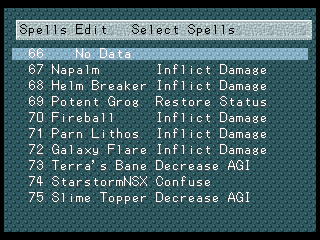
The list shows ten numbers at a time, and opens with the number you last worked on at the top.
| Keys | In a list of 230 or 250 | In a list of 15 |
|---|---|---|
| ↑ ↓ | one row; past the top or bottom row the list scrolls by one | the same, round in a circle |
| ← → | ten numbers | ten numbers, round the circle (from 1, → lands on 11, then on 6) |
| □ + ↑ ↓ | fifty numbers | — |
| □ + ← → | a hundred numbers | — |
| × | opens the number under the cursor (an empty one starts a new record) | the same |
| ○ | back to the top menu | the same |
There is no New command. Press × on an empty number (No Data) and its edit page opens with a blank record named New Magic, New Item, New Chara, New Skill or New Monster. The new record is kept only if you change something on it; leave it untouched and the number stays empty. When MEM is too low for one more record, the empty numbers are grey and buzz.
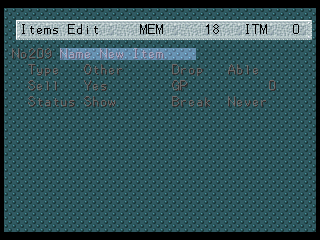
On an edit page, □ with the d-pad browses: ↑ and ↓ go to the previous and next number, ← and → ten back or on, without going back to the list. MEM and the counter on an edit page show the values from before the record you have open; they catch up when you leave.
Move, Copy and Delete#
| Command | What it does | Asks first? |
|---|---|---|
| Edit | Opens the list; × on a number opens its edit page. | — |
| Move | Pick a record, then a number for it (Where?). The record changes number; nothing that uses it is told. | No. A record already there is overwritten. |
| Copy | Pick a record, then a number. A duplicate is made there. Where? stays open, so one record can go to several numbers. | No. A record already there is overwritten. |
| Delete | Deletes the record under the cursor at once. | No. |
| Delete All | Empties the whole list. | Yes: Yes / No, the cursor on No. |
| Start Party | Character Edit only: the party a new game starts with (up to four). | — |
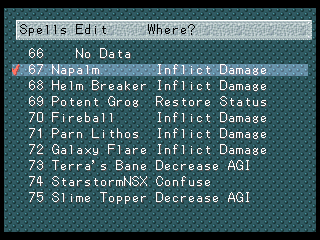
Only Delete All asks. Delete deletes at once, and Move and Copy write over whatever is at the target number without a word. Moving or copying an empty number onto a record deletes the record. (The map editors, by contrast, ask Overwritten. Proceed?.) The safety net is the next section.
Keeping or throwing away a visit#
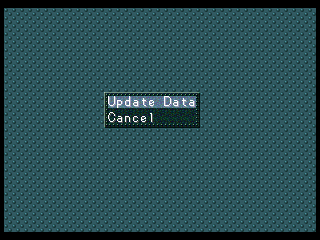
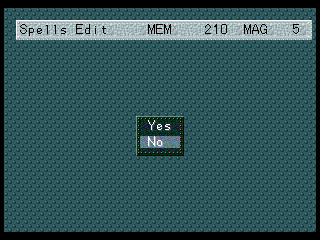
Everything you do in an editor stays provisional until you leave it. ○ on the top menu asks Update Data or Cancel. Update Data stores the whole visit; Cancel throws all of it away, deletes and moves included, as if you had never opened the editor. ○ on the question itself takes you back to the top menu with your work intact. If you changed nothing, the editor closes without asking.
References aren't fixed#
Moving or deleting a record doesn't update what uses it. Move item 12 to 40 and every character who starts with it, every shop that sells it, every treasure chest and every event that gives or checks it still names number 12, now empty or some other item. The same holds for magic, skills and monsters. Character Edit is the one exception: it keeps its own Start Party in step (with a bug, below). Events and maps are never touched.
Number entry#
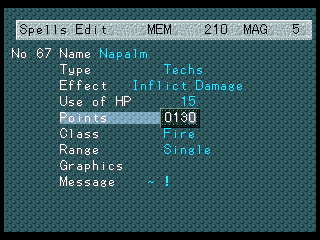
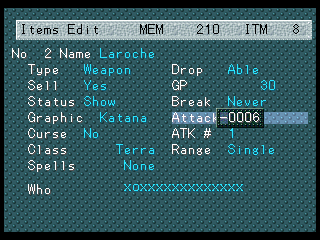
Numbers are entered digit by digit. The cursor starts on the last digit; ← → move between digits and ↑ ↓ change the one under the cursor (9 wraps to 0 without carrying). Signed fields have a ± column first, which ↑ ↓ flip. △ jumps to the largest value allowed, or to the smallest if it is already the largest. × confirms (it buzzes if the number is out of range); ○ cancels.
Names#
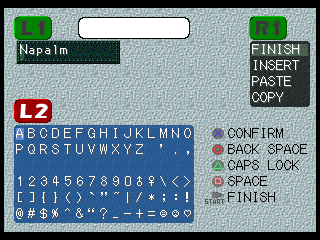
Every name in the database takes up to 12 letters. The keyboard is the one used everywhere (Getting started). It opens empty on a brand-new record, so you don't have to delete New Magic first. START finishes; if you typed something it asks Update Data or Cancel for the name.
What Gameplay Edit switches off#
Four switches in Gameplay Edit remove whole features, and the database editors grey the fields that belong to them.
| Switch in Gameplay Edit turned off | What the database editors do |
|---|---|
| Special Attack | A magic's Type shows None, greyed. Skill Edit's S ATK page and Monster Edit's S ATK pattern type are greyed. Turning the switch off also makes every magic a Magic-type magic, and turning it back on doesn't undo that. |
| Use of Class | A magic's and a weapon's Class show None, greyed. An accessory's four class effects become one Magic GRD effect. Monster Edit greys Class and shows one Magic GRD row for its four class rows; setting it sets all four. |
| M DEF | M DEF is greyed in Character, Skill and Monster Edit. Food refuses the M DEF kind. An accessory can still pick M DEF (an oversight). A skill's M DEF condition then never passes. |
| Abilities | A skill's Ability is greyed. A monster's Abilities are not affected. |
Magic Edit#
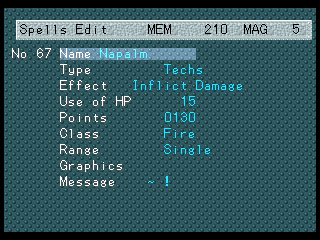 123456789
- 1 The header the editor's name (here Arc Arath's Spells Edit), MEM and the MAG counter
- 2 The number No 1–230
- 3 Name 12 letters
- 4 Type Magic or S ATK (here Techs, Arc Arath's name for S ATK)
- 5 Effect one of 36; it decides which rows below can be set
- 6 Cost and Points Use of MP (Use of HP for an S ATK), and the strength
- 7 Class and Range the magic class; one target, a group or all
- 8 Graphics opens Animation Edit
- 9 Message the battle message's verb
A magic is a spell or a special attack, used by the party, by monsters and by items. 230 numbers, 40 bytes each. Manual 1 pp. 18–22
| Field | Choices | What it does |
|---|---|---|
| Name | up to 12 letters | What the menus, the battle messages and the shops call it. |
| Type | Magic, S ATK | Magic costs MP and is stopped by Silence. S ATK costs HP and isn't. Needs Special Attack on. Changing the type resets the cost. |
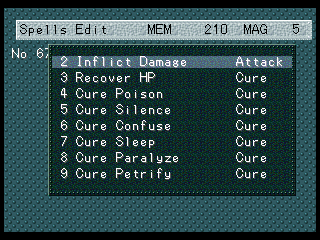
| Effect | 36 effects | What it does. The effect decides which fields below can be set (table). |
| Use of MP or Use of HP | 0–99 | The cost of one cast: MP for Magic, HP for S ATK. |
| Points | 0–9999 | The strength: the damage of Inflict Damage, the HP of Recover HP, the amount of a Decrease or an Increase. |
| Class | Magic A, B, C, None | Its class, for the class table and for resistances. Needs Use of Class on. |
| Range | Single, Group, All | One target, one group of monsters, or every target on the other side (or the whole party, for a healing magic). |
| Graphics | Animation Edit | The animation it plays: up to three actions of picture, movement and sound. |
| Message | 20 messages | The battle message: Summon ~ ! and so on, ~ standing for the magic's name. |
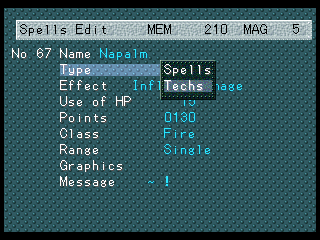
Magic and S ATK#
Magic costs MP; S ATK costs HP. Magic can be stopped by Silence, has its MP halved by the 1/2 MP Cost ability and can be doubled by 2 × Magic Damage. An S ATK ignores all of that, and it also passes straight through Reflect Magic, the resistance barriers and the Resist Magic ability. Its HP cost can kill the user, and the attack still goes off. The party's S ATK list greys any the member can't afford.
Damage magic ignores Guard, Luck and AGI. Inflict Damage deals its Points, give or take 10 %, adjusted by the class table and by the target's resistance to that class. It never misses and never crits. Weapon attacks are the ones that depend on Attack and Guard. The details are on How battles work.
Party members learn Magic by level (each character's Magic Level page) and S ATKs from their skill (Skill Edit). A magic can also be put on an item, which casts it when used.
The 36 effects#
The Effect decides which other fields mean anything, and the editor greys the rest. The picker shows a category beside each: Attack, Cure, Special, Aid or Other. The table numbers the effects in the picker's order.
| Effect | Fields it uses | In battle | In the field menu | |
|---|---|---|---|---|
| 1 | None | — | no | no |
| 2 | Inflict Damage | Points, Range, Class, Graphics | damage: Points, ±10 % | no |
| 3 | Recover HP | Points, Range, Graphics | heals Points, ±10 % | yes; also revives a member at 0 HP |
| 4 | Cure Poison | Range, Graphics | yes | yes |
| 5 | Cure Silence | Range, Graphics | yes | no |
| 6 | Cure Confuse | Range, Graphics | yes | no |
| 7 | Cure Sleep | Range, Graphics | yes | no |
| 8 | Cure Paralyze | Range, Graphics | yes | yes |
| 9 | Cure Petrify | Range, Graphics | yes | yes |
| 10 | Cure Curse | Range only: no animation | no | yes; destroys cursed equipment |
| 11 | Revive | Range, Graphics | yes, to 1 HP | no |
| 12 | Restore Status | Range, Graphics | yes | yes |
| 13 | Decrease Attack | Points, Range, Graphics | yes; M DEF may resist | no |
| 14 | Decrease Guard | Points, Range, Graphics | yes; M DEF may resist | no |
| 15 | Decrease AGI | Points, Range, Graphics | yes; M DEF may resist | no |
| 16 | Poison | Range, Graphics | M DEF roll, then always | no |
| 17 | Silence | Range, Graphics | M DEF roll, then 90 % | no |
| 18 | Confuse | Range, Graphics | M DEF roll, then 80 % | no |
| 19 | Sleep | Range, Graphics | M DEF roll, then 70 % | no |
| 20 | Paralyze | Range, Graphics | M DEF roll, then 60 % | no |
| 21 | Petrify | Range, Graphics | M DEF roll, then 50 % | no |
| 22 | Death | Range, Graphics | M DEF roll, then 40 % | no |
| 23 | Increase Attack | Points, Range, Graphics | yes, up to 9999, until Dispel or death | no |
| 24 | Increase Guard | Points, Range, Graphics | the same | no |
| 25 | Increase AGI | Points, Range, Graphics | the same | no |
| 26 | Steal MP | Range, Graphics | takes MP for the caster | no |
| 27 | Reflect Magic | Range, Graphics | Magic aimed at the target bounces back | no |
| 28 | 100% Res Magic | Range, Graphics | Magic has no effect on the target | no |
| 29 | 50% Res Magic | Range, Graphics | Magic does half | no |
| 30 | 50% Res S ATK | Range, Graphics | S ATK does half | no |
| 31 | Enemies HP | Graphics | shows the targets' HP | no |
| 32 | Dispel | Graphics | cancels every Increase, Decrease and barrier on both sides | no |
| 33 | Teleport | — | no | yes, on the world map |
| 34 | Escape Dungeon | — | no | yes, in a dungeon |
| 35 | Encounter Down | — | no | yes, in a dungeon |
| 36 | Check Items | — | no | yes |
Statuses roll twice (Status effects). First the target's M DEF resists, with a chance of M DEF ÷ 9999 (so 9999 is immune); then the status's own chance, from Poison's certainty down to Death's 40 %. Decreases use the first roll only. Increases last until Dispel or death and stack up to 9999. Revive brings a member back with 1 HP. Effects that can't be used in battle say Nothing Happened.. if a monster's pattern tries them.
In the field menu, Recover HP heals 90–110 % of its Points (exactly, at 9999) and brings back a member at 0 HP. Teleport works only on the world map; Escape Dungeon and Encounter Down only in a dungeon.
Message#
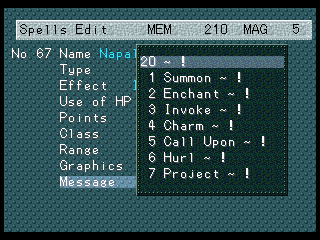
The Message is the battle line shown when the magic is cast, with ~ standing for its name: Summon ~ !, Enchant ~ !, Invoke ~ !, Charm ~ !, Call Upon ~ !, Hurl ~ !, Project ~ !, Radiate ~ !, Emit ~ !, Discharge ~ !, Gather ~ !, Command ~ !, Exhale ~ !, Release ~ !, Raise ~ !, Call Forth ~ !, Beckon ~ !, Awake ~ !, Ignite ~ !, and a bare ~ !. The sample game uses the bare one for all its magic, and Arc Arath for all but one of its 190.
Animation Edit#
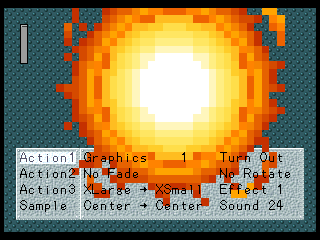 1234567891011
- 1 The timeline how far the preview has played
- 2 The preview the animation, over and over (△: once)
- 3 The actions Action1–3 play in turn; Sample copies a ready-made animation
- 4 Graphics picture 0–30
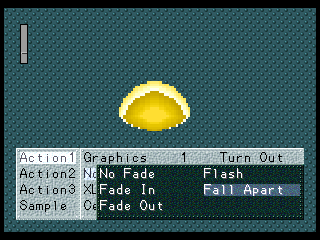
- 5 Movement fade, flash or fall apart
- 6 Size from one size to another
- 7 Position from one place to another
- 8 Shake wobbles and turns
- 9 Rotate spins
- 10 Effect the arrangement: one picture, a row or a column
- 11 Sound sound effect 0–78
Graphics opens Animation Edit, where a magic's animation is built from up to three actions. Each action is one picture, moved, sized and sounded; the three play one after another. The preview at the top plays the whole animation over and over while you edit, with a timeline at the top left. △ switches between looping and playing once; □ replays. An action without a picture or a sound is skipped.
| Setting | Choices | What it does |
|---|---|---|
| Graphics | 0–30 | The picture; 0 is none. ↑ ↓ step by one, ← → by ten, △ jumps between 0 and 30. |
| Movement | No Fade, Fade In, Fade Out, Flash, Fall Apart | How it appears and goes. |
| Size | XLarge, Large, Medium, Small, XSmall, from one to another | 800 %, 400 %, 200 %, 100 % and 50 % of the picture. It grows or shrinks between the two. |
| Position | Above, Center, Below, Up, Down, Left, Right, from one to another | Where on the target it starts and ends. |
| Shake | No Shake, Shake Vert, Sway, Turn, Turn Out, Turn In | A wobble or a turn on its way. A shake makes the action a little longer. |
| Rotate | No Rotate, Rotate, Spin, Side Spin, Reverse | How the picture turns as it plays. |
| Effect | 1–5 | The arrangement: 1 one picture; 2 and 3 a row across; 4 and 5 a column. |
| Sound | 0–78 | The sound effect; 0 is none. Silent while you pick: □ replays the animation to hear it. △ jumps between 78 and 0. |
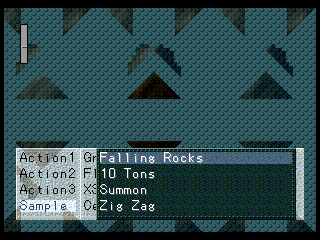
Sample copies a finished animation into all three actions: Falling Rocks, 10 Tons, Summon, Zig Zag, Lightning Ball, Barrier, Shield Break, Cat's Eye, Musical Note, Icicles, Angel, Fire Ball, Question Mark, Boomerang, Snow Crystal and Heart. The list previews each as the cursor moves. A sample is a good starting point: pick one, then change its pictures and sound.
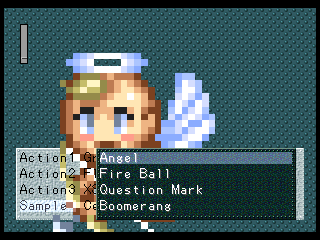
The thirty pictures are a sun, a note, a crescent, a rock, a dome, a light orb, a triangle, a star, a cross, an icicle, a snowflake, a hexagram, a skull, an eye, a heart, a silver tube, a slab, a ring of sparkles, a second star, flames, a potion, a cupid, a spiral, a "10t" weight, an hourglass, "!?", a squiggle, a crystal, a crest and a lightning orb. Most cycle their colours as they play.



The magic pictures that animate, as they play in battle. The graphics catalogue has them all.
The sound is one of the 78 sound effects (Music and sound). It doesn't play while you scroll the picker; press □ afterwards to hear it in the animation.
Magic Edit's bugs#
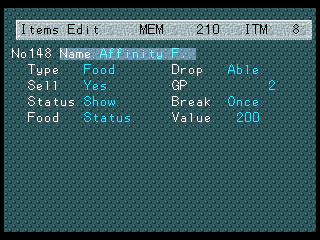
Item Edit#
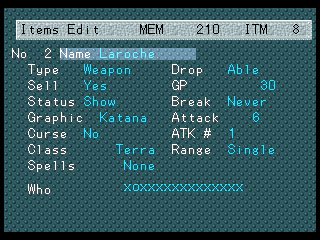 1234567
- 1 Name 12 letters
- 2 Type one of 11; the rows from Graphic down depend on it
- 3 Drop, Gold, Break throw-away, the price (here GP), the chance of being used up
- 4 Sell, Status shops buy it; the description shows its numbers
- 5 The weapon's rows hit animation, Attack, Curse, strikes (ATK #), Class, Range
- 6 Magic cast when the weapon is used from Equip (here Spells)
- 7 Who which characters can equip it
An item is anything the party can carry: equipment, potions, spell scrolls, vehicles, keys and stat-raising food. 250 numbers, 24 bytes each. Every item has the same seven fields at the top; the rest depend on its Type. Manual 1 pp. 23–28
| Field | Choices | What it does |
|---|---|---|
| Name | up to 12 letters | Its name in menus, shops and treasure messages. |
| Type | 11 types | What the item is (table). Picking a type, even the same one, resets the type's own fields. |
| Drop | Able, Unable | Whether the player can throw it away in the Item menu. Unable suits key items. |
| Sell | Yes, No | Whether shops buy it. They pay half its Gold. |
| Gold | 0–999,999 | Its price in shops. The label is the money's name from Parameter Name (Arc Arath's GP). |
| Status | Show, Hide | Whether the description line in menus and shops shows its numbers. |
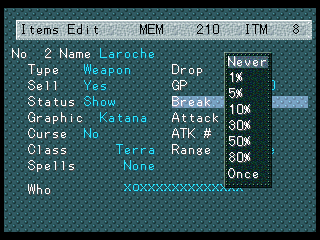
| Break | Never, 1%, 5%, 10%, 30%, 50%, 80%, Once | The chance that one use uses it up; Once always does. At 10 % an item lasts ten uses on average. |
Break is how often an item is used up. A potion is Once; a reusable item is Never; anything between gives an item that works a few times before it is gone. Using equipment through the battle Equip command rolls Break too, and a broken piece leaves its slot.
The 11 item types#
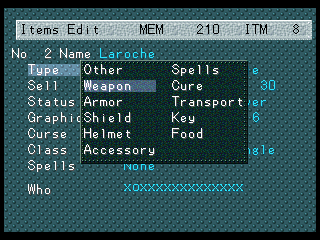
| Type | Its own fields | What it is for |
|---|---|---|
| Other | — | Items with no use of their own: plot items, things events look for, things to sell. |
| Weapon | Graphic, Attack (±9999), Curse, ATK # (1 or 2), Class, Range, Magic, Who | Held in R Hand or L Hand. Attack adds to the holder's; ATK # 2 strikes twice; Range Group or All hits more monsters; Graphic is the hit animation. |
| Armor | Curse, Guard (±9999), Magic, Who | Worn on the Body; Guard adds to the wearer's. |
| Shield | Curse, Guard, Magic, Who | Held in a hand, in place of a weapon. |
| Helmet | Curse, Guard, Magic, Who | Worn on the Head. |
| Accessory | Effect, Value, Curse, Magic, Who | Access1 or Access2: raises a stat or resists a magic class (table). |
| Magic | Magic | Casts its magic when used. The type's name is Parameter Name's (Arc Arath's Spells). |
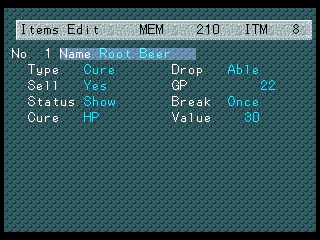
| Cure | HP, MP, Poison, Silence, Confuse, Sleep, Paralyze, Petrify, Revive or Cure All; a Value for HP and MP | Heals or cures one member. In battle it gives exactly its value, with no ±10 %. |
| Transport | Boat, Blimp | Owning a Boat lets the party sail the world map's sea; a Blimp lets them fly to any town in sight. |
| Key | A–H | Starts an event set to start by Use Key with that key. |
| Food | STR, DEF, STA, INT, AGI, Luck, M DEF or EXP; a Value (±9999) | Raises (or lowers) one character's stat for good. EXP is added without a level-up there and then. |
Changing the Type resets the type's own fields, even when you pick the type it already had, so set the Type first.
Equipment#
Where equipment goes: a Helmet on the Head, Armor on the Body, a Weapon or a Shield in R Hand or L Hand, Accessories in Access1 and Access2.
- Attack and Guard add to the wearer's. Each hand's weapon strikes with its own Attack. Physical damage is about half of Attack minus Guard (How battles work).
- ATK # 2 makes the weapon strike twice. Range Group or All lets it hit a group or every monster. Class puts it in the class table.
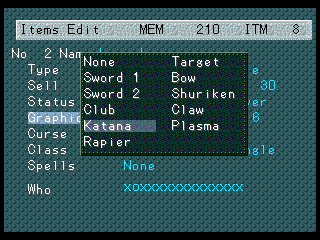
- Graphic is the hit animation: None, Sword 1, Sword 2, Club, Katana, Rapier, Target, Bow, Shuriken, Claw or Plasma.
- Curse On means the item can't be taken off once equipped. Only Cure Curse, cast in the field, removes it, by destroying it.
- Magic gives the piece a spell the wearer can cast with the battle Equip command, with the item's Break chance.
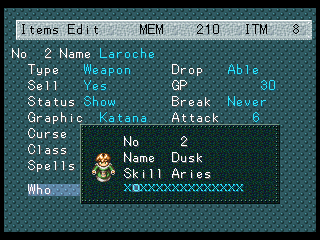
- Who lists which of the 15 characters may equip it. The item picker in Character Edit offers only items that the character is allowed.
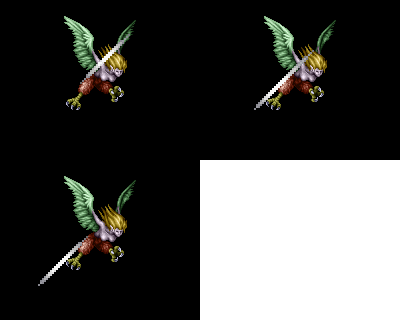
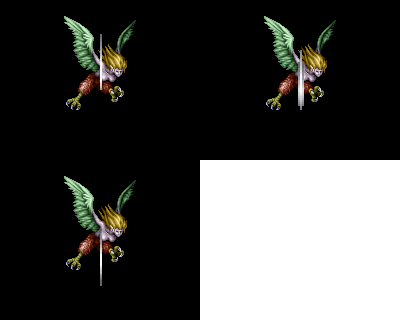
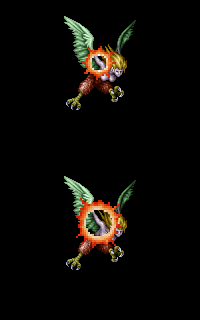
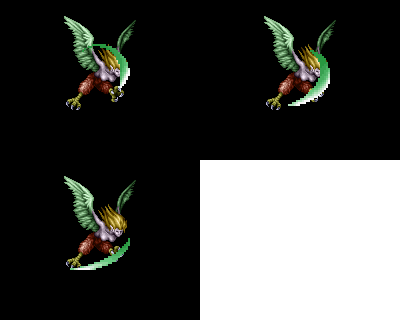
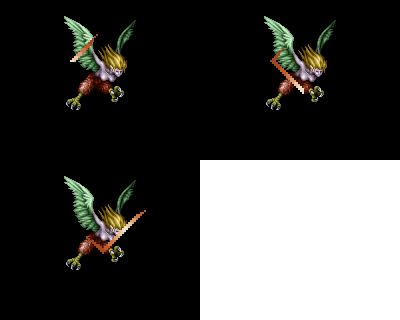
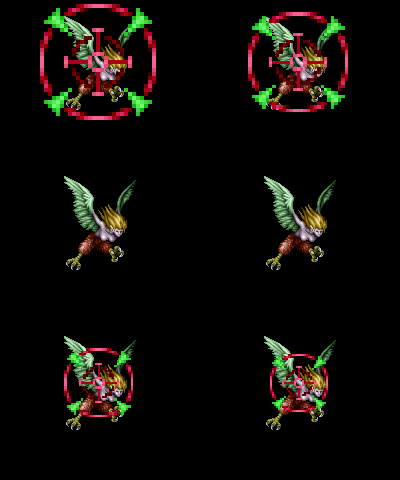
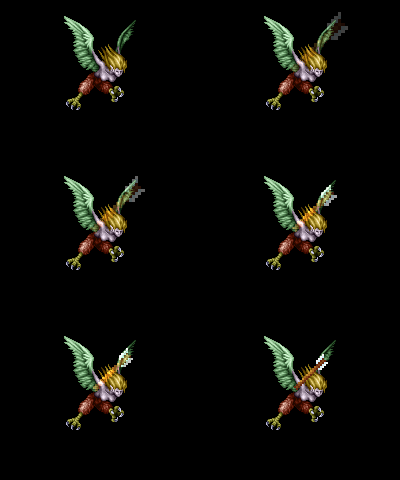
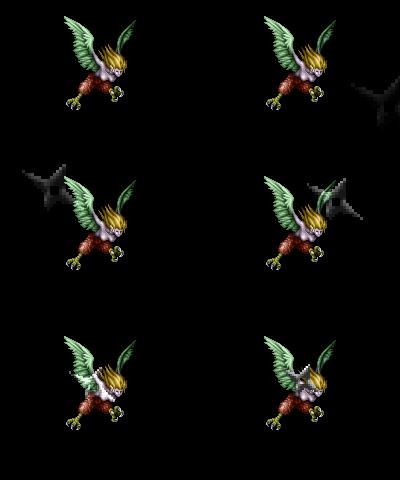
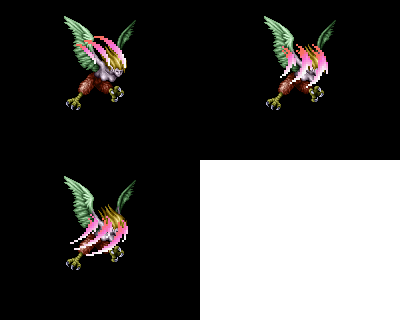
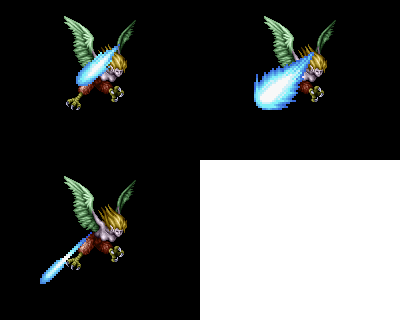
The weapon hit animations.
Accessories#
| Effect | Value | In play |
|---|---|---|
| Nothing | — | Only its Magic, if it has one. |
| Attack, Guard, AGI, Luck, M DEF | ±9999 | Added to the wearer's stat. |
| Magic A, Magic B, Magic C, Magic None | 0–100 % | Cuts the damage of magic of that class by that much. A party member's resistances come only from accessories. |
| Magic GRD (Use of Class off) | 0–100 % | The same against all magic damage. |
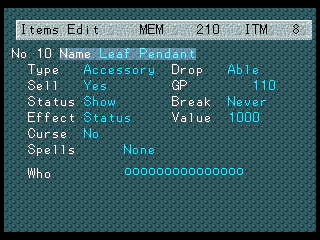
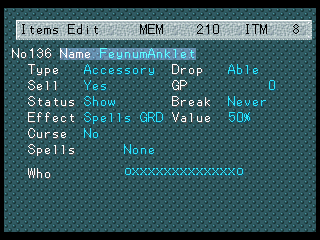
Accessories are the only way to give party members a magic resistance. A resistance of 100 % stops that class's magic damage entirely. With Use of Class off the four effects become one, here Spells GRD, which resists all magic damage.
Item Edit's bugs#
Character Edit#
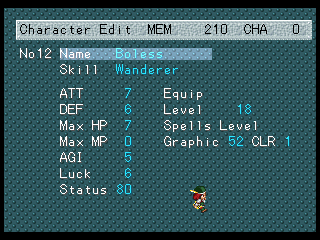 12345678
- 1 Name 12 letters
- 2 Skill the job the character starts with
- 3 Growth STR to M DEF, 0–99 a level (here under Arc Arath's names)
- 4 Equip the starting equipment
- 5 Level the starting level, with a preview of the stats
- 6 Magic Level when each magic is learnt (here Spells Level)
- 7 Graphic, CLR the walking sprite and its colours
- 8 The preview the sprite walking
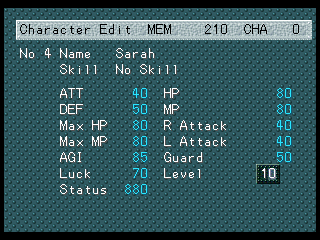
A character is a party member: a name, a sprite, starting equipment and level, and how fast each stat grows. 15 numbers, 260 bytes each, the biggest record of the five. Manual 1 pp. 29–32
| Field | Choices | What it does |
|---|---|---|
| Name | up to 12 letters | The character's name. |
| Skill | a skill, or none | The skill (job) the character starts with: an ability, growth added to theirs, S ATKs. |
| STR, DEF, STA, INT, AGI, Luck, M DEF | 0–99 each | Growth: how much the stat rises each level (below). |
| Equip | six slots | The starting equipment: Head, Body, R Hand, L Hand, Access1, Access2. |
| Level | 1–99 | The starting level. The page shows the stats it gives. |
| Magic Level | a level per magic, or -- | The level at which they know each Magic-type magic. |
| Graphic | 0–68, and imports | The walking sprite (0: none). Anime Maker imports come after 68. |
| CLR | 1–4 | Its colour set. |
How stats grow#
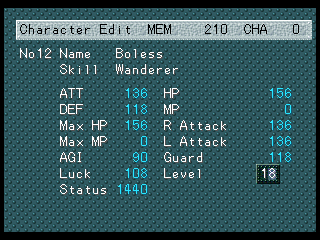
Every stat is its growth times the level, plus a small starting value: 10 for STR and DEF, 30 for STA, nothing for the rest, and never more than 9999. STR is the attack, DEF the guard, STA the maximum HP and INT the maximum MP. A level-up adds the growth again; maximum HP and MP rise with it, but the current HP and MP are not refilled. The skill's growth is added to the character's while they hold it, so the same character grows differently as a Knight than as a Wizard.
| Stat (Arc Arath's name) | Growth | Start | At level 18 |
|---|---|---|---|
| STR (ATT), the attack | 7 | 10 | 7 × 18 + 10 = 136 |
| DEF, the guard | 6 | 10 | 6 × 18 + 10 = 118 |
| STA (Max HP) | 7 | 30 | 7 × 18 + 30 = 156 |
| INT (Max MP) | 0 | 0 | 0 |
| AGI | 5 | 0 | 5 × 18 = 90 |
| Luck | 6 | 0 | 6 × 18 = 108 |
| M DEF (Status) | 80 | 0 | 80 × 18 = 1440 |
The EXP a level needs is fixed, the same for every character: 10 for level 2, 1,084 for level 11, 94,846 for level 22, and then 32,768 more for each level after; level 99 needs 2,617,982. The table is on How battles work.
Magic Level#
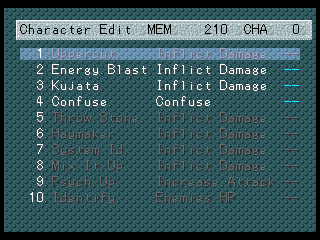
Magic Level lists every magic with the level at which this character knows it; -- means never. A character knows a magic once their level reaches its number, including at the start. S ATKs are greyed: they come from skills. A level of 0 or -- clears it.
Equip, Graphic and CLR#
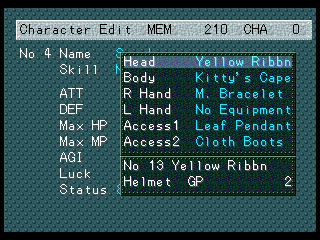
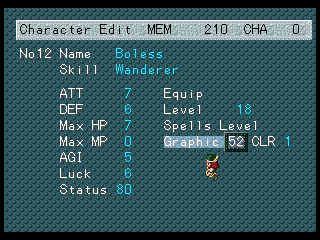
Equip sets what the character starts with. For each slot the picker offers only items of the fitting type that the item's Who allows.
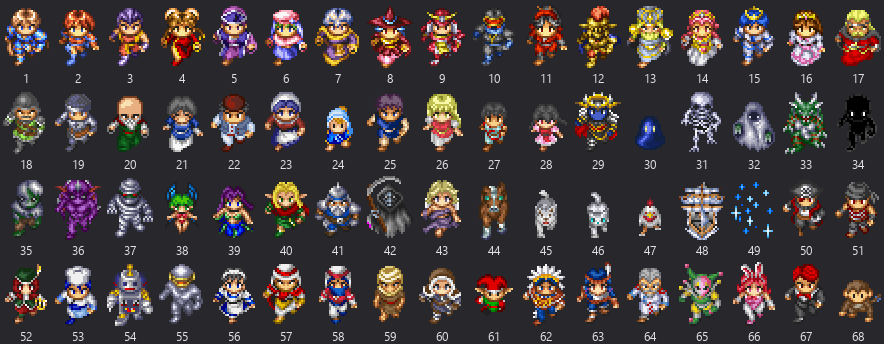
Graphic picks the walking sprite, 1 to 68, and CLR one of its four colour sets. The preview on the edit page walks round its box. Characters imported from Anime Maker follow number 68; the editor has no picture of them to show. All 68 built-in sprites are in the graphics catalogue.
Start Party#
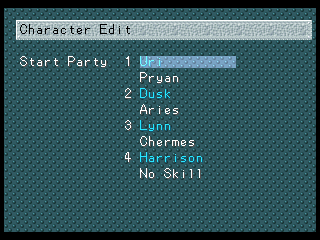
Start Party is the party a new game begins with, up to four characters. Picking Not selected removes a member and closes the gap. The sample game's Start Party is a single invisible character.
Character Edit's bugs#
Skill Edit#
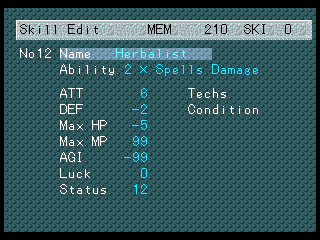
A skill is a job: an ability, a bonus to growth, and a ladder of S ATKs. Each character holds one at a time. 15 numbers, 52 bytes each. Skills are changed in play by a Skill shop or an event command (Events). Manual 1 pp. 33–36
| Field | Choices | What it does |
|---|---|---|
| Name | up to 12 letters | The skill's name, as the menus and Skill shops show it. |
| Ability | 16 abilities | A power the character has while they hold the skill (table). Needs Abilities on. |
| STR … M DEF | −99 to 99 each | Added to the character's own growth while they hold the skill (the sum stays within 0–99). |
| S ATK | eight rows, +0 to +7 | The S ATKs the skill teaches, and after how many level-ups. Needs Special Attack on. |
| Condition | nine kinds | What a character needs to take the skill in a Skill shop. |
Abilities#
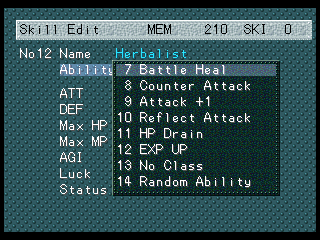
An ability works for as long as the character holds the skill. How each one plays out in a fight is on How battles work.
| Ability | What it does |
|---|---|
| None | — |
| First Attack | A better chance of a First Attack when a battle starts. |
| Treasure Find UP | A better chance of each treasure. |
| 1/2 MP Cost | Magic costs half its MP, rounded up. |
| 2 × Magic Damage | Each cast has a 20 % chance of double strength. |
| Critical Hit UP | Critical hits 16 % of the time, not 6 %. |
| Battle Heal | Heals a twentieth of max HP at the end of each turn. |
| Counter Attack | A 10 % chance of hitting back when struck. |
| Attack +1 | One more strike, with the stronger hand. |
| Reflect Attack | Weapon attacks bounce back at the attacker. |
| HP Drain | Each strike has a 20 % chance of healing the striker by about a tenth of the damage. |
| EXP UP | 10–50 % more EXP from each battle. |
| No Class | The class table doesn't apply to its attacks. |
| Random Ability | One of ten abilities at random each round. |
| AI | The character fights by themselves. With nothing to cast it Guards; it never falls back to a plain attack. |
| Resist Magic | Immune to Magic-type magic (not to S ATK, or to Cure items). |
S ATK#
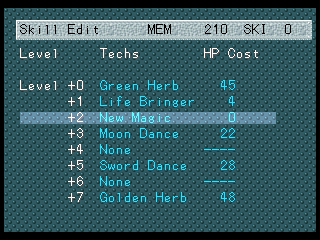
The S ATK page lists up to eight S ATKs with a level step each, +0 to +7. Only S ATK-type magic can be chosen. A character learns the +0 S ATK as soon as they take the skill, and each +n one after n level-ups while holding it. S ATKs once learnt are kept when the character changes skill.
Condition#
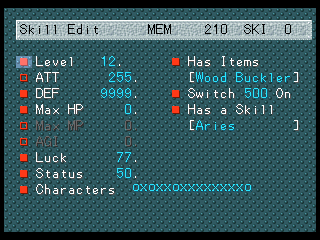
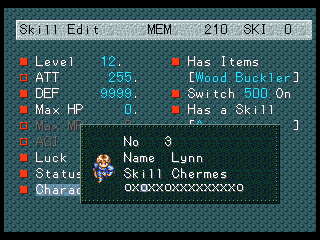
Conditions decide who may take the skill in a Skill shop. Every ticked condition must pass. A shop costs no money: the conditions are the price.
| Condition | Value | Passes when |
|---|---|---|
| Level | 0–99 | the character's level is at least this (never, if Level is off in Gameplay Edit) |
| STR, DEF, STA, INT, AGI, Luck, M DEF | 0–9999 | the stat, without equipment, is at least this |
| Characters | O or X for each of the 15 | the character is marked O |
| Has Items | one item | the party has it. Taking the skill uses one up at the item's Break chance (an equipped copy counts, but isn't taken) |
| Switch | 1–500 | that switch is on |
| Has a Skill | one skill | the character's current skill is this one |
Skill Edit's bugs#
Monster Edit#
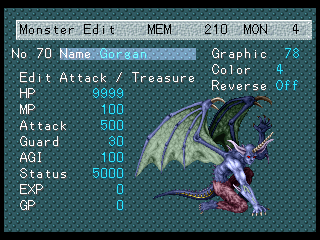 123456
- 1 Name follows the graphic's name until you type one
- 2 Edit Attack / Treasure abilities, patterns, class, treasure
- 3 HP to M DEF its battle stats (M DEF here under Arc Arath's Status)
- 4 EXP, Gold the rewards (Gold here GP)
- 5 Graphic, Color, Reverse the picture, its colours, mirrored
- 6 The preview the monster as it will look in battle
A monster is everything the party fights: stats, a picture, up to eight attack patterns and a treasure. 250 numbers, 52 bytes each. Monsters are put into battles with Monster Appearance. Manual 1 pp. 37–42
| Field | Choices | What it does |
|---|---|---|
| Name | up to 12 letters | Its name in battle. Until you type one, it follows the graphic's name. |
| Edit Attack / Treasure | a page | Abilities, the eight attack patterns, class and immunities, the treasure. |
| HP | 1–9999 | Its hit points. |
| MP | 0–9999 | What its Magic patterns spend. Short of MP, the cast fails (Not Enough MP!). |
| Attack | 0–9999 | The strength of its strikes. |
| Guard | 0–9999 | Taken off a strike's attack. |
| AGI | 0–9999 | Its place in the turn order, and how hard it is for the party to flee. It doesn't make the monster harder to hit. |
| M DEF | 0–9999 | Its chance (M DEF ÷ 9999) to shrug off status magic and Decreases. It doesn't cut magic damage. |
| EXP | 0–9999 | EXP for beating it, given in full to each living member. |
| Gold | 0–999,999 | Money for beating it. |
| Graphic | 0–99, and imports | The picture. Its name is the default name. |
| Color | 1–4 | Its colour set. |
| Reverse | Off, On | Mirrors it. |
The picture#
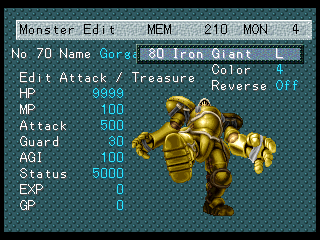
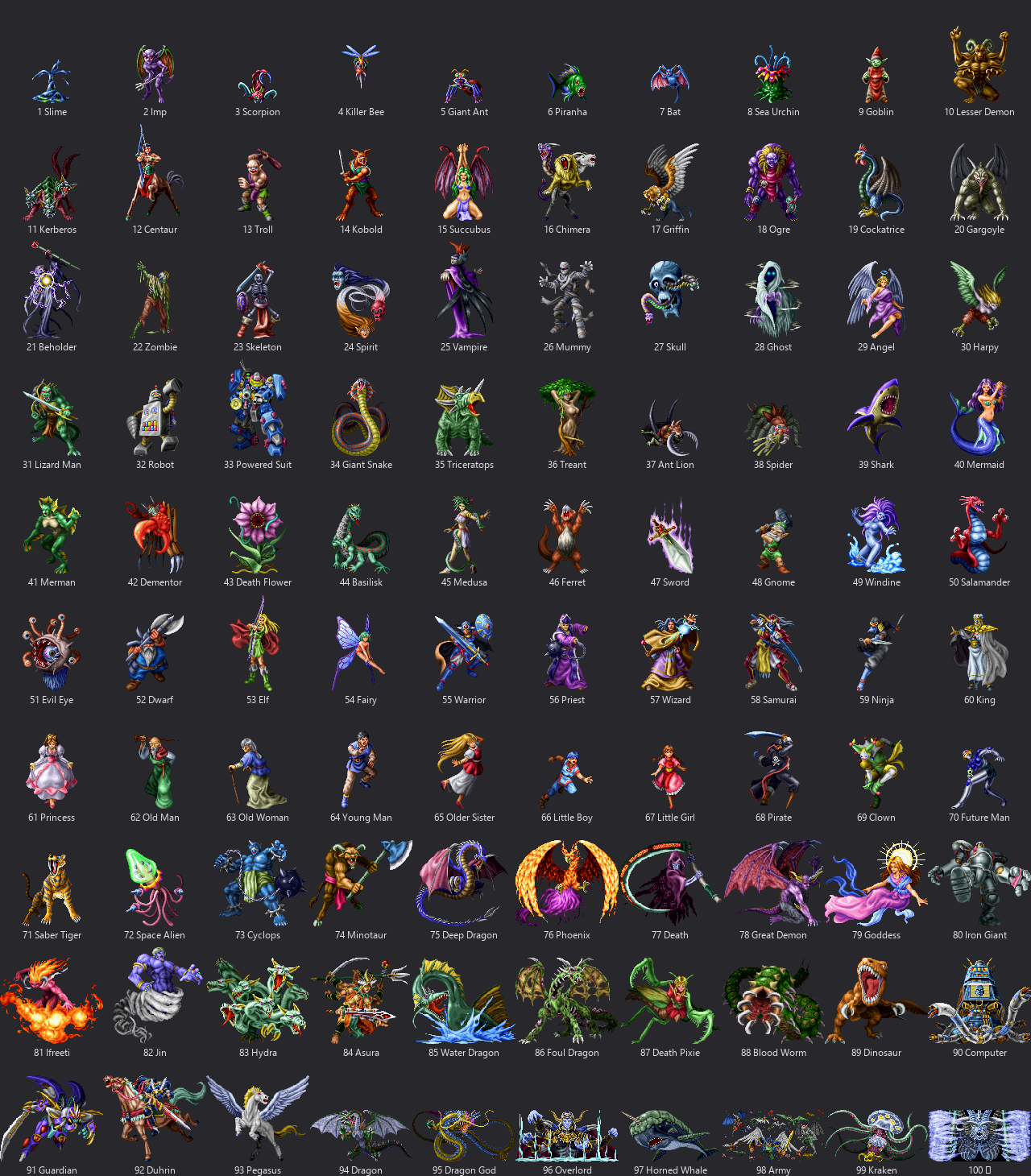
There are 99 monster pictures, from the Slime up to the Kraken, in four sizes: graphics 1–9 are small (48 pixels wide), 10–72 medium (72), 73–93 large (144) and 94–99 huge (240). The picker shows each one's size, S, M, L or LL; the size matters when monsters are lined up for a battle (Monster Appearance). Each has four colour sets, and Reverse mirrors it. Pictures imported from Anime Maker follow 99.
A new monster takes its picture's name (Slime, Dragon …) until you type one; after that, a new picture no longer renames it.
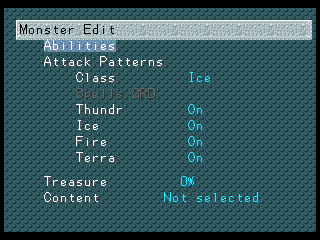
Attack and treasure#
Edit Attack / Treasure holds the monster's behaviour. Manual 1 pp. 39–41
| Ability | What it does |
|---|---|
| No Critical Hits | Its strikes never crit. (Can't be set with Critical Hit UP.) |
| Critical Hit UP | Crits 16 % of the time, not 6 %. (Can't be set with No Critical Hits.) |
| Double Attack | Two actions a turn. (Can't be set with Multi Attack.) |
| Multi Attack | Three actions a turn. (Can't be set with Double Attack.) |
| Miss 1/2 of the Attacks | Half its strikes miss. |
| 2 × Damage | Doubles its Magic, Steal MP and Self-Destruct, always. Strikes and S ATK aren't doubled. |
| Auto Battle | Its actions are chosen by the AI first, falling back to its patterns. |
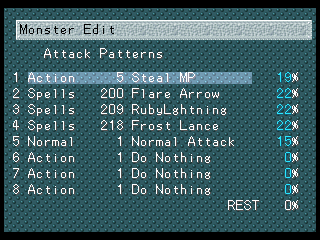
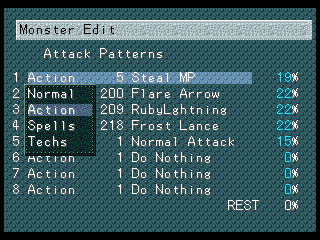
Each turn the monster picks one of its eight patterns, weighted by their percentages. The weights can't add up to more than 100; REST shows what's left. The weights are relative: a monster whose patterns add up to 60 still acts every turn, and a pattern of 0 % (or Not selected) never happens.
| Kind | Patterns | What it does |
|---|---|---|
| Normal | Normal | One strike at a party member. |
| Normal | Charge | A strike whose damage isn't halved (about twice a Normal), which can't crit, and which every target able to act counters. |
| Normal | Poison, Paralyze, Sleep, Petrify | A strike that, if it hits, always inflicts the status. |
| Normal | Critical Hit | A strike that, if it hits, kills. |
| Action | Do Nothing, Guard | Wastes the turn, or guards (halving the next strikes' damage). |
| Action | Flee | Runs away half the time. No EXP, Gold or treasure from it. |
| Action | Self-Destruct | Only once its HP is down to half: deals its remaining HP to the whole party and dies, giving nothing. |
| Action | Steal MP | Takes MP from a party member. |
| Action | Hide | Vanishes for a while: it can't be targeted. If every monster left hides, the party wins. |
| Magic | any Magic-type magic | Casts it. |
| S ATK | any S ATK | Uses it, paying HP. |
Class and the four class rows (needs Use of Class): the monster's own class sets how weapons and magic of each class hurt it (How battles work). Setting a class row Off makes the monster immune to magic damage of that class; weapons of that class still hit. With Use of Class off, one Magic GRD row sets all four.
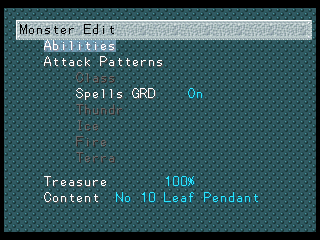
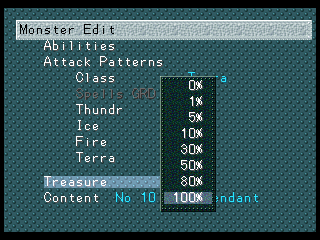
Treasure is a chance (0, 1, 5, 10, 30, 50, 80 or 100 %) and one item. Each monster beaten rolls for its own treasure; a monster that flees or self-destructs gives nothing. EXP and Gold of all the monsters beaten are added up, and every living member gets the full EXP.
Monster Edit's bugs#
The sample game's database#
Load Sample (EDIT) loads a small finished game, Gobli's Adventure, whose database is a good model to read (Getting started). New System Data, by contrast, starts with every list empty.
| Kind | In the sample game |
|---|---|
| Magic | 28: 24 Magic and 4 S ATK. 12 Inflict Damage, 6 Recover HP, 3 Sleep, 2 Confuse; one each of Increase Attack, Decrease Guard, Cure Poison, Revive and Enemies HP |
| Items | 52: 25 weapons, 12 armour, 6 helmets, 3 shields, 3 Cure items, 2 Food, 1 Other |
| Characters | 12: Gobli, Mark and Neko; Hero, Knight, Cleric and Wizard (twice each); and an invisible character 15, the Start Party |
| Skills | 8: AI, Goblin, Wall Hole, Kitten, Cat, Tom Cat, King Goblin, Lord Goblin |
| Monsters | 35, from Imp, Forest Fairy and Bat to Garamos |
The sample game has Special Attack, M DEF and Abilities on and Use of Class off, and keeps the default Parameter Names.