Covers Manual 1 pp. 57–58 Manual 1 pp. 61–64 Manual 2 p. 22.
Memory cards and saves#
Everything RPG Maker makes lives on memory cards: the game you are building, the games people play, their saves and the pictures drawn in Anime Maker. Nothing is kept on the disc and nothing survives switching the console off unless it was saved. This chapter covers what goes on a card and what it costs, the MEMORY CARD menu in EDIT, the Utility, passwords, games that need more than one card, and how to keep it all safe.
A PlayStation memory card holds 15 blocks of 8 KB, and every file takes at least one whole block, so a card holds at most 15 files. Two cards can be in the console at once, in slot 1 and slot 2, and every card page lets you switch between them with ← and →.
What a game is made of#
A game made in RPG Maker is never one file. It is a System Data file (the settings, the database and every map), one or more Scenario Data files (the events), and any Anime Maker pictures it uses. The players' game saves are separate files again. The files find each other by name:
| File | Made by | Blocks | The card's title for it | What it holds |
|---|---|---|---|---|
| System Data | EDIT → MEMORY CARD → Save → System | 1–15, by how well it compresses (Arc Arath's: 13) | RPG Maker SYS A name time | the settings, the database, every map, the encounters, Game Info, and the names of its imports |
| Scenario Data | EDIT → MEMORY CARD → Save → Scenario | 1–15 (an empty scenario: 1; Arc Arath's first: 15) | RPG Maker SCE A name time | every map's events and the start point |
| Game save | a Save Point, or Save in the field menu on the world map | 1 | RPG Maker GAME A leader level time | the party, items, Gold, switches, where the party is, the play time; the game's title and scenario name |
| Test Play save | the same, during Test Play | 1 | RPG Maker TEST A … | the same, kept apart from real saves |
| Anime Maker character | Anime Maker → RPG Data → Character | 1 | ANIME MAKER/CHARACTOR name | a walking character's frames |
| Anime Maker monster | Anime Maker → RPG Data → Monster | 1–4 by size (S to LL), fewer when packed | ANIME MAKER/MONSTER name | a monster picture, its size in the name (S, M, L, LL) |
| Anime Maker title picture | Anime Maker → RPG Data → Title | 8, fewer when packed (Arc Arath's: 2) | ANIME MAKER/BACKGROUND name | a 288 × 208 picture of 256 colours |
The title column is what the card itself stores for each file: the PlayStation's own card manager shows it, and so does RPG Maker's Utility. time is the play time in hours and minutes. The slots A to O are per kind and per card: a card can hold a System in slot A, a scenario in slot A and a game save in slot A, as long as there are blocks for them. Every game shares the same 15 game-save slots, so two games saved on one card take two different letters.
How many blocks a save takes#
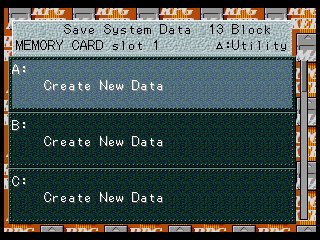
The System and the Scenario are compressed when they are saved. How well depends on what is in them, so the block count is only known at save time: the Save page works it out the moment it opens, and shows it in its header ("Save System Data 13 Block"). The MEM figures in the editors count the data before compression, and the room they count is the same for every game: 122,368 bytes for the System, which would be 15 blocks stored as it is. Compressed, a System usually comes to about two thirds of its size. Scenarios compress far worse, to about nine tenths, because most of a scenario is message text, which this compressor handles badly. A large scenario can fill a card on its own: Arc Arath's first scenario takes all 15 blocks.
The manual asks for "a minimum free area of three blocks" Manual 1 p. 61. Read that as the least a small game needs. A game of any size needs room for its System, its scenario, its Anime Maker files and at least one save, and the Save page tells you exactly what each file needs before it writes.
The MEMORY CARD menu#
EDIT → MEMORY CARD opens a small menu of five rows. It opens on Load every time; ○ takes you back to the EDIT menu (with its cursor on Edit Data).
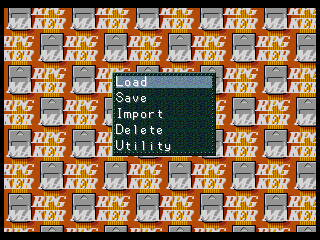
| Row | What it does | Asks first |
|---|---|---|
| Load | replaces the System or the Scenario being edited with one from a card | the password, if the file has one; "Current Data won't be saved" if there are unsaved changes (but not after a password: see below) |
| Save | writes the System or the Scenario being edited to a slot | Overwrite / Cancel when the slot holds a file |
| Import | registers an Anime Maker character, monster or title picture in an import slot | a Caution page, every time |
| Delete | removes an import from its slot | nothing |
| Utility | copies, moves and deletes card files; formats a card | Yes / No before a Delete; the format page |
The manual lists the commands as Load, Save, Utility and Import / Delete Manual 1 p. 61; on screen the order is Load, Save, Import, Delete, Utility.
Saving and loading your game#
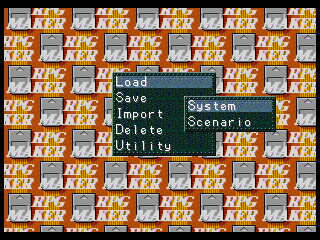
Load and Save both ask first which half of your work you mean: System (characters, maps and the rest of System Data) or Scenario (the events). The question opens on System every time. The two are saved separately, and each must be saved on its own: saving the System doesn't save your events.
The slot pages#
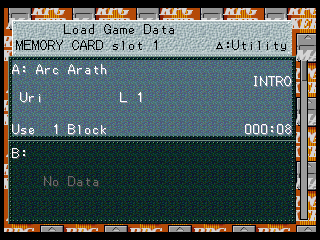
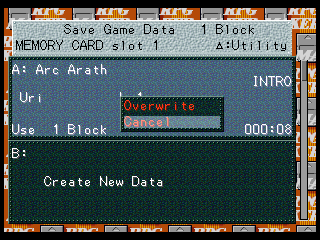
Every card page has the same frame: what it does at the top ("Load System Data", "Save Scenario Data 1 Block"), the card it is showing ("MEMORY CARD slot 1") and △:Utility, which opens the Utility from here. The page always opens on slot 1; ← → switch cards. Three slots show at a time, A to O: ↑ ↓ scroll (and wrap round from O to A), and R1 / L1 move the cursor down and up a screen's worth.
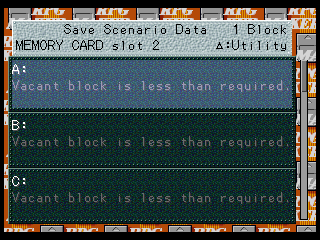
A slot that holds a file shows the game's or scenario's name, the author (the first staff name of the System it was saved with), how many blocks it uses and the play time. An empty slot shows No Data when loading, and when saving Create New Data, or Vacant block is less than required. in grey when the card lacks the room. Grey slots can't be chosen.
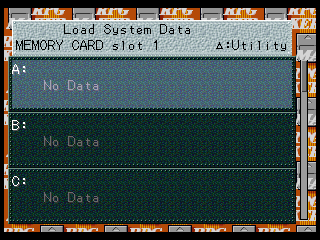
While a card is being read the page shows Checking... for a few seconds: the more files on the card, the longer. With no card in the slot the page says MEMORY CARD is not Found.
Saving#
Choose a slot and press ×. On a slot that already holds a file, Overwrite / Cancel comes up, and it opens on Cancel, so a stray × does no harm. Overwriting counts the old file's blocks as free, so a game can be saved over its old file on a full card, as long as it hasn't grown.
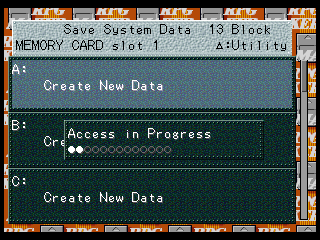
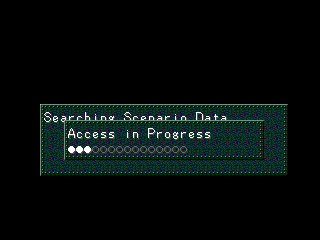
Access in Progress shows one ○ per block, filled in as each is written, at about two seconds a block. When it is done the list simply shows the new file: there is no "saved" message. Saving the System also stores the editor's play clock in it, and that time is what the slot shows.
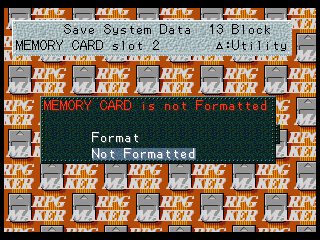
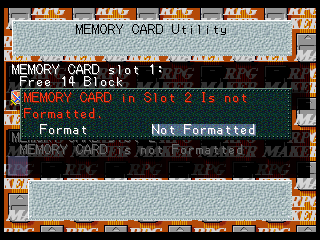
If the card isn't formatted, the Save page offers to format it. The question opens on Not Formatted; choose Format to prepare the card. Formatting erases everything on it.
Loading#
Choose a slot and press ×. If the file has a password, a page asks for it: "Please enter Password.", and each button press shows as *. Up to eight presses; ○ takes one back, and × checks it. A wrong password just clears the entries, with no limit on tries (Passwords).
If what you are editing has unsaved changes, a question comes first in red: "Current Data won't be saved. Do you wish to Continue?". It opens on Cancel. Choose Overwrite to load anyway.
A load replaces what is in memory completely: the System load replaces the whole System, the Scenario load the whole Scenario. Nothing checks that the scenario you load belongs to the System you have; keep their names alike so you can tell.
Loading a System also brings back its play clock, its Configuration (cursor speed, Mono or Stereo, the editor's music) and then looks for its Anime Maker pictures on both cards (Importing). A file whose data doesn't match its checksum (a damaged card) stops at Failed, and nothing in memory changes.
Unsaved changes#
When you leave EDIT with unsaved work, RPG Maker asks "Current Data will not be Saved. Do you wish to Continue?". It opens on No, which takes you back. Yes goes to the top menu, and the work is still in memory: choosing EDIT again finds it as you left it, until the console is switched off or GAME loads another game.
What counts as a change: Update Data in Title Edit or a database editor, any store in Set System Data or Set Scenario Data, Update Data in Event Edit, an Import or a Delete, and any visit to Configuration or Gameplay Edit, even one that changed nothing (System Data). A Save or a Load clears it.
Importing Anime Maker pictures#
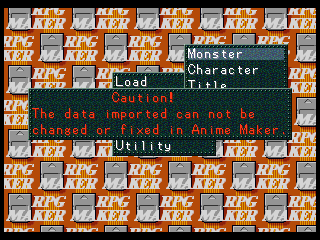
Characters, monsters and title pictures drawn in Anime Maker (RPG Data → Character, Monster, Title) reach a game through Import (Anime Maker). Choose Import, read the Caution page ("The data imported can not be changed or fixed in Anime Maker."; × or ○ closes it), then the kind.
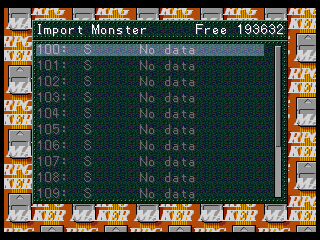
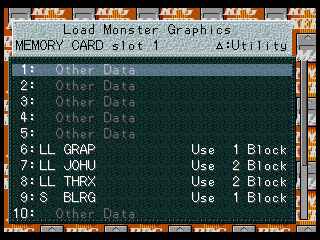
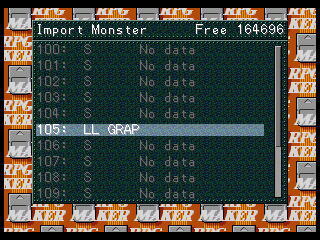
The import list shows the slots of that kind. Choose one (empty or not) and the next page lists the files of the card: those of the right kind in white, with their name and size, anything else as Other Data in grey. × on a file reads it and registers it in the slot.
| Kind | Slots | Numbered | Used as | Import memory |
|---|---|---|---|---|
| Monster | 15 | 100–114 | a monster's graphic in Monster Edit | S 5,896 · M 8,776 · L 17,416 · LL 28,936 bytes |
| Character | 9 | 69–77 | a character's graphic in Character Edit and an event's graphic in Event Edit | none (the characters go to video memory) |
| Title | 1 | 10 | the last entry of Title Edit's Screen list | 60,660 bytes |
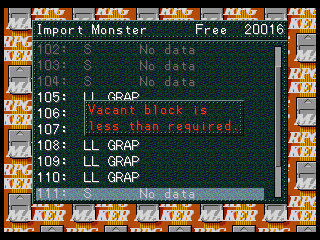
Free at the top of the monster and title lists is the import memory left, out of 193,632 bytes: the next import must fit into it. Six LL monsters fit; the seventh doesn't, and the page says "Vacant block is less than required.", the card's message reused for memory. Characters take no import memory, so their list shows no Free figure.
A few things to know:
- Importing into a slot that is in use replaces it without asking. One file can go into several slots.
- A character must be an RPG character. Anime Maker's Demo character banks show as Other Data.
- Delete removes an import at once, with no question; the slot then shows No data. Monsters, characters and events that used it keep pointing at the empty slot.
- Import and Delete count as unsaved changes to the System.
The Utility#
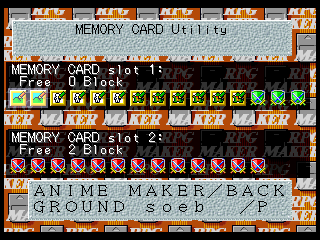
The Utility is RPG Maker's card manager: it copies, moves and deletes any file on the cards, RPG Maker's or another game's, and formats a blank card. Choose it from the MEMORY CARD menu, or press △ on any card page, the game's own save screen included.
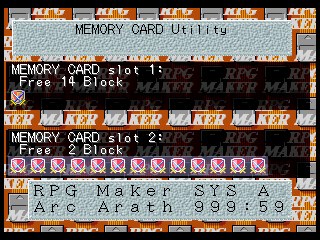 1234
- 1 The card in slot 1 its state, here Free 14 Block of 15; or "is not Present.", "is not Formatted", "Checking..."
- 2 A 1-block file one square per block, drawn with the file's own icon; a dark square is a free block
- 3 A 13-block file Arc Arath's System Data: the cursor bar covers every block of the file under it
- 4 The file's title as stored on the card: the kind, the slot letter, the name and the play time
Each card is a row of 15 squares. → jumps to the next file, ← to the one before, ↑ ↓ change card. The bottom line shows the title of the file under the cursor. Some icons animate.
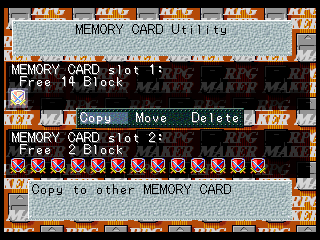
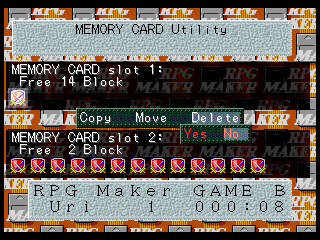
× on a file opens Copy, Move and Delete, with a line of help for each. Copy and Move write to the other card, and are greyed when they can't: the other card is missing or not formatted, it already holds a file of the same name, or it hasn't the room. The Utility never says which, and it never overwrites. Delete asks Yes / No, opening on No.
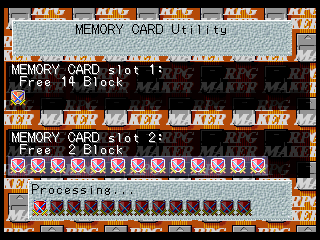
While it works, the help line says Processing...; a copy reads the whole file and then writes it, about two seconds a block each way. If anything goes wrong it says Failed until the next move.
Moving the cursor onto an unformatted card opens the format page by itself: "MEMORY CARD in Slot 2 Is not Formatted.", opening on Not Formatted. This is the only Format in RPG Maker that a game's save screen can use (below).
Passwords#
A System or a Scenario can have a password, set in Set System Data or Set Scenario Data (Passwords). It is up to eight presses of twelve buttons: △ □ ↑ ↓ ← → START SELECT L1 L2 R1 R2 (× and ○ are OK and Cancel). It is saved with the file.
Only EDIT → MEMORY CARD → Load asks for it. GAME → Start and Continue never do: a password keeps people from opening your game in the editor, not from playing it. Nothing in the program can recover a forgotten password. Write it down.
Playing from cards#
What the game looks for#
GAME's Start and Continue load a game from the cards in steps, by name, slot 1 before slot 2, the first match winning:
| When | What must be on a card | Matched by |
|---|---|---|
| EDIT → MEMORY CARD → Load System | the System; then every import it names | the import's name (and a monster's size) |
| GAME → Start | the System (chosen from a list); its start scenario; its imports | the Scenario Name in Set System Data |
| GAME → Continue | the game save; a System with the same title; the scenario the save names; the imports | game title, scenario name, import names |
| Next Scenario (an event) | the next scenario | the name in the command |
| Test Play → Continue | a Test Play save of the System and Scenario now loaded | game title and scenario name |
Start lists the System Data files; choose a game and it reads it (no password), then looks for the scenario named as its start scenario, then for its Anime Maker files. If the scenario isn't on either card: "No Scenario Data found. / Insert MEMORY CARD with the / following saved Scenario Data." and the name. Insert the card, or ○ to give up.
Continue lists the game saves. A save made in the sample game (GAME → Sample) reads the sample from the disc again, so it needs no other files.
Saving in play#
Players save at a Save Point (an event, Events) or with Save in the field menu, which the menu offers only on the world map, never in a dungeon. Both open the save screen. A game save is always 1 block, in one of the card's 15 game-save slots.
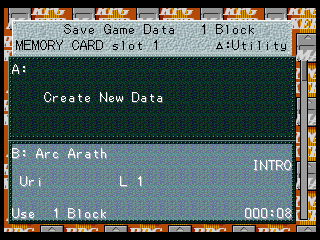 12345678
- 1 What is saved, and its size a game save is always 1 block
- 2 Which card ← → switch between slot 1 and slot 2
- 3 △:Utility the Utility, from any card page
- 4 Slot letter and game title 15 slots, A to O, shared by every game on the card
- 5 Scenario name the scenario the party is in
- 6 The party names and levels, up to four
- 7 Blocks used
- 8 Play time hours and minutes, up to 999:59
A slot in use asks Overwrite / Cancel, on Cancel. After the write the list shows the new save, and the player leaves with ○.
A Game Over returns the party to the last save, or to the last Next Scenario if that came later (Playing a game).
In Test Play the same screen saves Test Play saves, kept apart from real ones ("Save Test Data"), and Test Play's Continue offers only saves of the System and Scenario now loaded. Test Play's Quick Save writes nothing to a card: it lasts until the console is switched off.
If a card is pulled out during a save, the screen shows Failed; put the card back and save again.
Games on several cards#
Next Scenario#
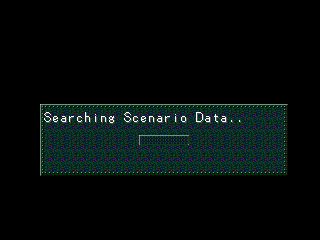
A scenario has room for 120,276 bytes of events, and the whole Scenario saves to at most 15 blocks. A longer story is split into scenarios joined by the event command Next Scenario, which names the scenario that comes next (Events). In play it fades out, says "Searching Scenario Data..", and reads that scenario from whichever card has it.
If neither card has it, it asks for the card ("No Scenario Data found." and the name) and waits: there is no cancel, and it searches again as soon as a card is put in. So a game on several cards should tell the player which card to insert, in a message just before the Next Scenario.
What carries over: the switches, the party, the items and Gold all stay. The old scenario's events are gone, the party starts at the new scenario's start point, and the Treasure events start afresh (each scenario numbers its own). The rest of the event that ran Next Scenario never runs.
- A scenario whose name is the same as the one already loaded is skipped: give every part its own name.
- Next Scenario doesn't work in Test Play. It shows "In [Test Play] mode, [To Next Scenario] event won't be executed. If you want to execute next scenario [NAME], play [Game]." and carries on. Test each part by loading it in EDIT, and the joins from GAME.
- Every scenario is a file of its own, so the number of scenarios has no limit; one card holds up to 15 of them, as blocks allow.
Two Systems for one game#
The System holds every map of the game, and nothing joins two Systems. Several games in the community archive got past the System's room anyway: they ship two System Data files with the same title. Continue looks for a System by the save's title and takes the first it finds, so a player who saves, resets, swaps cards and chooses Continue carries on under the second System. It works when:
- both Systems have the same Title name;
- the database numbers the party carries (characters, items, magic) mean the same in both;
- the player is told to save, reset, change cards and Continue.
Way of Peace, Binding Souls and Treasure Hunters do it to get past the System's size: the second System drops the early maps and adds the late ones. Dynasty Project IV: Revelation gives each card a complete half. Each guards against a new game started on its second card: either the second System's start scenario is a short scenario that tells the player to begin with card 1, or an event checks.
Keeping saves safe#
- Don't reset, pull a card or switch off during "Access in Progress" or "Processing..." Manual 1 p. 64. A failed overwrite loses the old file too.
- Keep a second copy on another card: the Utility's Copy takes a minute.
- Keep the Anime Maker files with the game, and give them to anyone you give the game to.
- Save the System and the Scenario before leaving EDIT, and after renaming parameters.
- Write down your passwords.
- When the card is full, the Utility can delete other games' files to make room Manual 1 p. 64.