How it works#
This is the technical page: the programs on the disc, how RPG Maker loads its code, where things sit in memory, what a save file holds, how an event runs, how a frame is drawn, how the music plays and where the random numbers come from. The other pages say what you see; this one says how the program does it. Addresses are RAM addresses in RPG3.EXE unless a line says otherwise, and numbers with 0x are hexadecimal.
The disc and its programs#
The disc holds three programs and their data. The PlayStation starts SLUS_006.40, a small boot program: it shows the ASCII logo, plays Kuusou Kagaku's logo movie, shows the Spline and agetec logos, and then loads MAIN.EXE, the launcher with the title picture and the menu (Getting started). The launcher starts RPG3.EXE (RPG Maker) or ANIM.EXE (Anime Maker), and both go back to it when you leave: RPG Maker's RETURN runs LoadExec("cdrom:\MAIN.EXE;1"). The name RPG3 is the Japanese original's: RPG Tsukuru 3 (Compared with RPG Tsukuru 3).
| File | Size | What it is |
|---|---|---|
SLUS_006.40 | 178,176 | The boot program: the ASCII logo, the Kuusou Kagaku movie, the Spline and agetec logos, then MAIN.EXE |
KUUSOU.STR | 270 frames | Kuusou Kagaku's logo movie: 320 × 240 at 30 frames a second, mono XA sound, 9 seconds |
DUMMY.STR | 59 frames | ASCII SOFT's old knight-on-horse logo, 15 frames a second; never meant to play (hidden) |
TIM_BOOT.LPK | 3 pictures | The three boot logos, LZSS-packed TIMs |
MAIN.EXE | 157,696 | The launcher: its title picture and menu, then RPG3.EXE or ANIM.EXE |
TIM_TT.LPK | The launcher's title picture, menu sheet and NOW LOADING tiles | |
ANM_OPN.APK | 2,028 | A small packed file the launcher names |
RPG3\RPG3.EXE | 1,079,296 | RPG Maker itself: the top menu, EDIT, GAME and Test Play |
RPG3\COMDATA.BIN | 8,220,672 | 899 entries: map sets, wallpapers, characters, objects, monsters, fonts, effects, title pictures, the sample game, tables |
RPG3\SOUND0.BIN | 4,202,496 | 110 entries: the sound banks, the jingles, the 35 songs |
RPG3\OVERLAY.BIN | 1,034,240 | 25 sections of code and data, read in when needed: the editors, the battle engine, the field menu, the card pages |
ANIM\ANIM.EXE | 514,048 | Anime Maker |
ANIM\… | Anime Maker's own files: TIM.LPK (51 pictures), ANM.APK, ANIM.VB, the sample library SAMPLE.DAT with its index SAMPLE.IDX |
The boot program has no random numbers in it: the logos always come in the same order, and a button pressed during the first logo skips straight to the launcher. Why a horse sometimes shows up anyway is told on Hidden and unused.
The three archives#
RPG Maker keeps almost everything in three archive files in the RPG3 folder. RPG3.EXE holds a directory for each: a count, the CD path, the developers' PC path (C:\PTCL\GAME\DATA\COMDATA.BIN and the like, never used on a disc), and then one {offset, size} pair per entry. Every load is a request for (archive, entry), queued to the CD drive with the address to read it to, and the drive seeks to the archive's first sector plus the offset ÷ 2,048. Archive 0 is COMDATA, 1 SOUND0, 2 OVERLAY.
- COMDATA.BIN, 899 entries. 345 are TIM pictures; the rest are raw tables. The 249 map sets, 27 wallpapers, the world map's tiles, the object and character pages, the 100 monster pictures, the title pictures, the fonts, the effects and the sample game are all here. Entries are numbered in hexadecimal in the notes and the catalogue (
2A9is the font). Every picture is on the Graphics and Map sets pages; the entries nothing loads are on Hidden and unused. - SOUND0.BIN, 110 entries, all Sony's standard formats: the system sound bank, the jingles, a bank nothing uses, and the 35 songs (below, The sound driver).
- OVERLAY.BIN, 25 sections of program code and data, read into RAM when they're needed (next section).
Overlays: the code that loads when needed#
RPG3.EXE itself holds the front end, the field, the event interpreter, the text engine, the sound layer and everything a game needs while walking around. The rest is in OVERLAY.BIN's sections, which are plain, uncompressed MIPS code and data, loaded at fixed addresses. All the editors and the menus of play share one window at 0x80104000, so only one is in memory at a time; the battle engine loads higher, at 0x80117000, so that Battle Test can run beside Monster Appearance.
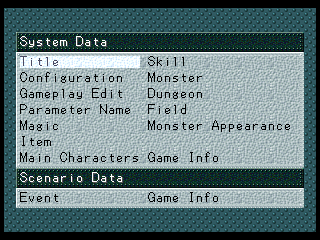 123456789101112131415
- 1 Title: Title Edit section 0E
- 2 Configuration: Configuration section 00
- 3 Gameplay Edit: Gameplay Edit section 02
- 4 Parameter Name: Parameter Name section 0B
- 5 Magic: the Magic editor section 09
- 6 Item: the Item editor section 07
- 7 Main Characters: the Character editor section 06
- 8 Skill: the Skill editor section 08
- 9 Monster: the Monster editor section 0A
- 10 Dungeon: Dungeon Edit section 01
- 11 Field: Field Edit section 05
- 12 Monster Appearance: Monster Appearance section 03, and 0F for Battle Test
- 13 Game Info: Set System Data section 0D
- 14 Event: Event Edit section 04
- 15 Game Info: Set Scenario Data section 0C
| Section | Size (bytes) | Loaded at | What | Opened from |
|---|---|---|---|---|
00 | 5,248 | 0x80104000 | Configuration | Edit Data → Configuration |
01 | 87,584 | 0x80104000 | Dungeon Edit | Edit Data → Dungeon |
02 | 4,736 | 0x80104000 | Gameplay Edit | Edit Data → Gameplay Edit |
03 | 51,134 | 0x80104000 | Monster Appearance (Battle Test loads 0F beside it) | Edit Data → Monster Appearance |
04 | 211,376 | 0x80104000 | Event Edit, the largest | Edit Data → Event |
05 | 71,249 | 0x80104000 | Field Edit | Edit Data → Field |
06 | 35,576 | 0x80104000 | Character editor | Edit Data → Main Characters |
07 | 48,784 | 0x80104000 | Item editor | Edit Data → Item |
08 | 40,512 | 0x80104000 | Skill editor | Edit Data → Skill |
09 | 49,644 | 0x80104000 | Magic editor | Edit Data → Magic |
0A | 50,256 | 0x80104000 | Monster editor | Edit Data → Monster |
0B | 4,540 | 0x80104000 | Parameter Name | Edit Data → Parameter Name |
0C | 2,608 | 0x80104000 | Set Scenario Data | Edit Data → Scenario Data's Game Info |
0D | 4,040 | 0x80104000 | Set System Data | Edit Data → System Data's Game Info |
0E | 5,464 | 0x80104000 | Title Edit | Edit Data → Title |
0F | 103,952 | 0x80117000 | the battle engine | every battle, and Battle Test |
10 | 2,392 | never | a text-rendering test | nothing (hidden) |
11 | 55,836 | 0x80104000 | the field menu (Item, Magic, Status, Equip …) | the field menu |
12 | 70,862 | 0x807E6F78 | Field Edit's auto-connect table (data, not code) | Field Edit, as it opens |
13, 15, 18 | 4 each | never | placeholders, one word each | nothing |
14 | 61,057 | 0x80104000 | the MEMORY CARD pages: Load, Save, Import, Delete, the Utility, Load Sample | EDIT → MEMORY CARD, Load Sample, GAME → Continue and Start, a Save Point |
16 | 13,260 | 0x80104000 | a PC-host file browser for the developers | nothing (hidden) |
17 | 27,418 | never | the Japanese name-entry keyboard's grids | nothing (hidden) |
Choosing an entry in Edit Data calls the overlay loader with the entry's number, which picks a load descriptor ({archive 2, section, address}) and reads the section, unless it is already the one in the window. Then the editor's task is started. Three sections (0x10, 0x13, 0x17) are named by no load descriptor at all, two more (0x15, 0x18) are four-byte placeholders, and the developers' file browser (0x16) has a descriptor that nothing passes: they are on Hidden and unused.
The state machine and the task system#
Modes#
main is a single loop: g_ModeStepTables[g_Mode][g_Step](). The mode (0x800F09AC) says which part of the program is running, the step (0x800F0988) where it is in it, and a mode change resets the step to 0. There are twelve modes; half of them do nothing but move on.
| Mode | What runs | Goes to |
|---|---|---|
| 0–3, 8, 9 | nothing: each just moves on to the next mode | the next mode |
| 4 | start-up: the video hardware and the graphics | 5 |
| 5 | the game systems set up again | 10 after Test Play, otherwise 6 |
| 6 | the top menu: GAME, EDIT, RETURN | 7, 10 or 11 |
| 7 | a game: GAME and Test Play both | 5 |
| 10 | the EDIT menu, Edit Data and the editors | 6, or 7 for Test Play |
| 11 | RETURN: back to MAIN.EXE | the launcher |
GAME and Test Play are the same mode with the same root task; they differ in the window that starts them and in a flag. A byte that lasts across modes, at 0x80010011 just above the BIOS area, carries what each mode must know about the others:
| Bit | Means |
|---|---|
| 0x01 | a System Data image is loaded |
| 0x02 | this editor visit has changed something (Event Edit uses 0x10) |
| 0x04 | the System Data has changes not saved to a card |
| 0x08 | a Scenario Data image is loaded |
| 0x20 | the Scenario Data has changes not saved to a card |
| 0x40 | after this game, go back to the EDIT menu (set by Test Play) |
Leaving EDIT tests 0x04 and 0x20 together: that is the "Current Data will not be Saved" question (Memory cards and saves).
Tasks#
Inside a mode, everything is a task: the top menu, every window, the field controller, each moving character, the event that is running, a fade, the music loader. Tasks come from a pool of about 180 records of 0xA4 bytes at 0x800E9570. Each has a class, one of 57 in the class table at 0x80093C64, and a state. A class's update is usually a one-line dispatcher into its state table, so each task is a small state machine of its own. A menu state opens a window as a child task and waits until the child has closed, then reads its answer.
Every task is on three lists: all tasks in the order they were made, the tasks of its layer, and the draw callbacks. Only the movement tasks (class 6) are on layer 1; everything else is on layer 0. That's how an event freezes the world: its first frame sets the update filter to layer 0 only, so no one walks until it ends.
One frame of a scene goes like this:
- read the pad;
- update the tasks (all of them, or only the layers in the filter, which is latched at the start of the frame); a task made during the walk is added at the end and runs in the same frame;
- swap the double buffer and clear the ordering table (534 slots);
- run every draw callback; each adds its primitives to the ordering table;
- wait for the GPU and the vertical blank, set the display, and draw the ordering table.
On a dungeon map the update order is the game root, the CD service, the field controller, the palette cycles, the party's four movement tasks, the event objects' movement tasks, and then whatever was made later: the event task, its windows, the text printer, the fade, the music loader. An event command's helpers therefore run in the same frame as the command, right after it.
Memory#
Main RAM#
The PlayStation has 2 MB of main RAM, and RPG Maker gives every part of it a fixed job. The figures below were measured over 232 saved emulator states, covering a whole playthrough, every editor and Battle Test.
The fixed places are why RPG Maker's limits are what they are. System Data has 0x1DE00 bytes (122,368) and no more, because the Scenario area starts right after it; the MEM counters in the editors count down what is left of these two areas (Limits). The game addresses the upper half of RAM through its fourth mirror (0x8073E200 and up are the same bytes as 0x8013E200), and nothing in any program uses the mirror below the save block, so the overlay window and the data areas never share memory.
Video memory#
Video memory is 1,024 × 512 sixteen-bit pixels. Pictures sit in it as 4-bit or 8-bit pages with their palettes (CLUTs, one row of 16 or 256 colours each), and every sprite on screen is drawn from there.
- The frame is drawn into a 312 × 224 area at (4, 8) of each buffer, with an offset of 4 pixels to the right, so every primitive lands 4 pixels right of its coordinates. Columns 0–3 and 316–319 and the top and bottom 8 rows are never drawn and stay black.
- Tiles are 24 × 24, 100 to a 240 × 240 page: tile t sits on page t ÷ 100 at (24 × (t mod 10), 24 × ((t mod 100) ÷ 10)).
- Map sets load their three pages to x = 768, 832 and 896 with their palette block at (832, 240); the 200 common object tiles load to x = 640 and 704. Each of the 249 map-set records names seven COMDATA files: the three pages, the palette number of each tile, two sample layers and the tile attributes (Map sets and tiles).
Memory card files and the save compression#
Every file RPG Maker writes is named BASLUS-00640 plus a kind and a slot letter or a name. A card has 15 blocks of 8 KB for files, after the directory block.
Name after BASLUS-00640 | What | Blocks | Body |
|---|---|---|---|
RMSYS + letter | System Data | 1–15 | word-LZ compressed (stored plain if it won't shrink) |
RMSCE + letter | Scenario Data | 1–15 | word-LZ compressed (the same) |
RMGAM + letter | a player's save | 1 | the 7,680-byte save block, plain |
RMGAT + letter | a Test Play save | 1 | the same |
C_ + name | an Anime Maker character | 1 | the picture, plain |
M_ + name | an Anime Maker monster | 1–4 by size (S to LL), fewer when packed | plain, or byte LZSS when packed |
B_ + name | an Anime Maker title picture | 2 | plain, or byte LZSS when packed |
The container#
A System or Scenario save starts with the standard PlayStation header (the "SC" mark, the icon, the block count and a 64-byte Shift-JIS title such as RPG Maker SYS A … hhh:mm). At 0x180 come RPG Maker's own fields: a checksum, the stored size, the size of the image in RAM and a flag that says whether it is compressed. At 0x190 is the password (16 bytes, up to eight button masks), then the author's name (the first staff name of the System Data) and the game or scenario name, which the card lists show. The data starts at 0x200.
- The checksum is
~(sum of the 32-bit words + the tail bytes + 0x12345678)over the stored bytes. It doesn't cover the header. - The password is checked against the header's copy, not the one inside the data, and only by EDIT → MEMORY CARD → Load. GAME never asks for it.
- What gets written. The game writes the stored data and then the rest of the compression buffer, up to the image's size rounded up: a compressed System save fills all its blocks, with whatever the buffer held after the stream. A Scenario save writes only its first part and leaves the rest of the block as the card had it. So two saves of the same data can differ in their last bytes.
Word-LZ compression#
The data is compressed with an LZ77 variant that works in whole 32-bit words. The stream is a list of little-endian 32-bit tokens:
- 0 ends the stream;
- an even token copies the next token ÷ 2 words as they are;
- an odd token copies (token ÷ 2) AND 0x7FFF words from (token ÷ 65,536) words back.
The compressor is Okumura's binary-tree LZSS, the classic one, run on words with a window of 2,048 words. If the stream would come out larger than the image, the image is stored as it is, with the flag 0, and Load just copies it. The project's tools rebuild every System and Scenario save in the fan archive byte for byte with the same rules.
It compresses badly. A match has to start on a word boundary in both copies, and almost everything in a save is made of bytes: text, tiles, stats, 12-byte names. A repeated phrase only matches when both copies happen to sit at the same offset mod 4.
| Images | Word LZ (the game) | Byte LZSS | zlib -9 |
|---|---|---|---|
| 168 System Data saves of the archive (median) | 61 % | 42 % | 31 % |
| 284 Scenario saves (median) | 86 % | 50 % | 38 % |
With Anime Maker's own byte LZSS the same Scenario saves would take about 40 % fewer blocks. Arc Arath's first scenario packs to 96 % of its size, 15 blocks, against 57 % and 9 blocks.
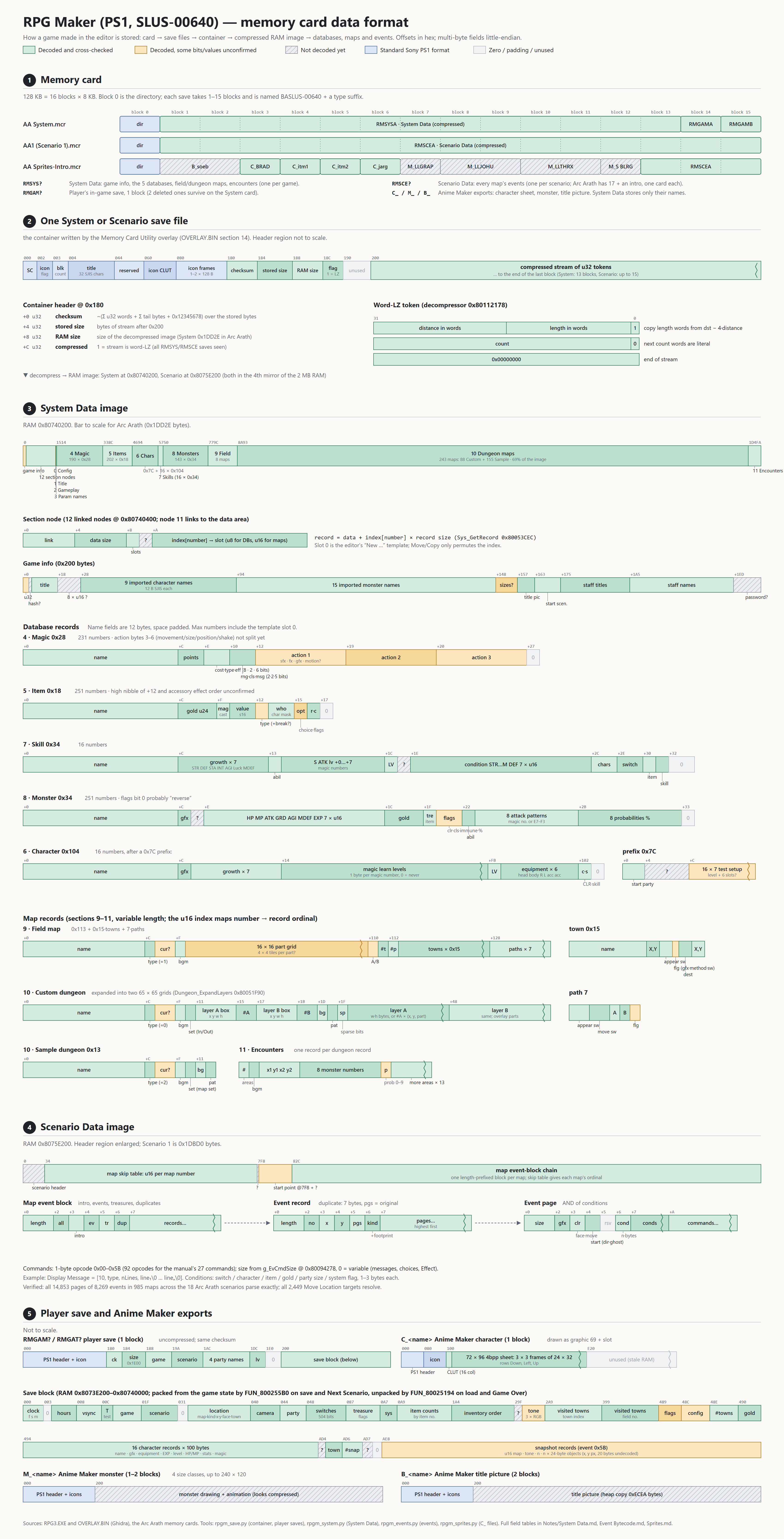
Player saves#
A save made at a Save Point is one block, uncompressed: the header, then a 7,680-byte copy of the save block at 0x8073E200. The block is packed from the live game state (party, switches, treasure flags, bag, Gold, position, the 16 characters, the play clock, the Ending's snapshots) when you save and at Next Scenario, and unpacked into a cleared game state at a new game, at Continue, and at Game Over. That is why a Game Over puts the party back where it last saved or last changed scenario, not at the scenario's start (Playing a game).
The live game state is 0x514 bytes at 0x807E8254, followed by 16 character records of 100 bytes. The switches are its bytes 6 to 0x44: switch n is bit n AND 7 of byte 6 + n ÷ 8, with the editor's 001–500 stored as 0–499.
System and Scenario data in outline#
System Data#
The System Data image at 0x80740200 is a 0x200-byte game info block, twelve linked section headers, and the twelve sections packed one after the other.
| Section | Record (bytes) | Numbers | Edited in | |
|---|---|---|---|---|
| 0 | Title screen | 16 | — | Title Edit |
| 1 | Configuration | 6 | — | Configuration |
| 2 | Gameplay switches | 1 | — | Gameplay Edit |
| 3 | Parameter names | 22 × 6 | — | Parameter Name |
| 4 | Magic | 40 | 231 (0 is the "New" template) | Magic |
| 5 | Items | 24 | 251 | Item |
| 6 | Characters | 260, after a 124-byte prefix | 16 | Main Characters |
| 7 | Skills | 52 | 16 | Skill |
| 8 | Monsters | 52 | 251 | Monster |
| 9 | Field maps | 275 + 21 a town + 7 a path | 9 | Field |
| 10 | Dungeon maps | varies | 991 (0–990) | Dungeon |
| 11 | Monster Appearance, one per dungeon | 2 + 13 an area | 991 | Monster Appearance |
- The game info holds the title, the System password, the names of the imported Anime Maker characters, monsters and title picture (only the names: the pictures stay on the card and are read again at every load), the start scenario's name, the four staff titles and names, and the play clock at the last save.
- A database section's header maps each number, the one the lists show and events refer to, to a storage slot: record = data + slot × record size. Slot 0 is the editor's "New …" template. Move changes only this table, which is why the records of a well-used game sit in a jumbled order; Copy and Delete move the bytes. The editors work on a copy and store a section only at Update Data.
- Maps and encounters (sections 9–11) are variable-length records found through a table of record numbers, one entry per dungeon number 0–990.
- Some bytes are never written by the code that makes new data, so they keep whatever was in RAM at the time. They differ from game to game and mean nothing.
The fields of each database record are on The database; the settings sections on System Data.
Scenario Data#
The Scenario image at 0x8075E200 starts with its password, its name and the length of its event data. Then comes a table of 991 map numbers, each giving the map's place in a chain of event blocks (0 = the map has no events and uses an empty block every scenario starts with), the start point (map, x, y; the game always starts facing down), and the chain itself.
- A map's block counts its records and lists them in order: the Intro Event, the Events, the Treasures, the Duplicates.
- An event record has the event's number, its position, its page count (for a Duplicate, the number of its original) and its kind, then its pages, the highest first.
- A page has its graphic (a character or an object and its number), its colour, facing, Move Type, speed, start method, the sides it starts from, Ghost, a key or item, its conditions, and then its commands.
- The page chosen is the highest whose conditions all pass; a page with no conditions is skipped, and page 1 is the fallback. Pages are chosen again when an event ends, after a battle, after the field menu and when you arrive on a map.
A Treasure event's switch conditions read the 256 treasure flags instead of the switches, and Next Scenario clears those, so treasures belong to one scenario. How to use all this is on Events.
The event bytecode and its interpreter#
A page's commands are a byte stream. Each command starts with a one-byte opcode, 0x00 to 0x5B, and Event Edit's 27 commands are 92 opcodes once their options are split (Switch ON and Switch OFF are two). Numbers of more than a byte are little-endian and unaligned. A table in RPG3.EXE (0x80094278) gives each opcode's length; three are variable: Display Message (its lines end in a zero byte), the 2 and 3 Messages choices, and Effect, whose length depends on the picture.
| Opcodes | Command (Event Edit's name) | One opcode per | Bytes |
|---|---|---|---|
00 | 27 Exit Event | — | 1 |
01 | 2 Move Location | destination: a dungeon, or a field and town (bit 15 of the map number) | 6 |
02 | 9 Wait | — | 2 |
03–06 | 6 Switching | Switch ON, Switch OFF, a range ON, a range OFF | 3, 3, 5, 5 |
07–0E | 7 Change Screen | Shift Screen, Default Screen, Flash, Swing, Change Color Slow / Quick, Default Color Slow / Quick | 3, 1, 1, 1, 5, 5, 1, 1 |
0F | 3 Take Over | — | 3 |
10 | 1 Display Message | — (the type is a byte inside: Normal, two balloons, Message 1, Message 2) | varies |
11, 13–15 | 16 BGM | Change BGM, volume, tempo, reverb | 2, 2, 2, 3 |
12, 16 | 17 Sound Effect | sound only, sound with pitch | 2, 3 |
17, 2D–2F | 18 Shop | Inn, Item Shop, Skills Selection Shop, Trade Shop | 3, 9, 9, 9 |
18, 19 | 20 Game System | ON, OFF | 2 |
1A–1C | 8 Inventory | Add Item, Remove Item, Gold | 2, 2, 4 |
1D–23, 2B, 2C, 4D | 15 Character Status | STR, DEF, STA, INT, AGI, Luck, M DEF; Learn Magic; Change Skill; Remove Equip | 4 (stats), 3, 3, 2 |
24–2A | 14 Party Status | HP, MP, EXP, Poison, Paralyze, Petrify, Restore | 3, 3, 4, 1, 1, 1, 1 |
30, 31 | 19 Battle | till the end, ending after n turns | 8, 9 |
32 | 21 Effect | — (12 pictures; the sub-type sets the length) | 3–5 |
33, 34, 35, 37, 39 | 4 2 Way Choice | Yes / No, Win / Loss, 2 Messages, Probability; 39 marks [Choice 2] | 1, 1, varies, 2, 1 |
36, 38, 3A | 5 3 Way Choice | 3 Messages, Probability; 3A marks [Choice 3] | varies, 3, 1 |
3B–3E, 56 | — (the engine's own) | restore the map's BGM, fade in after Move Location, choose every event's page again, run a pending Take Over, Game Over | 1 |
3F | 25 Save Point | — | 1 |
40–44 | 11 Party Display | Disappear, Default, Flashing, Main Character graphic, Ghost | 1, 1, 2, 4, 1 |
45–48 | 12 Party Members | Add, Remove, Change Whole Party, Move to Front | 2, 2, 5, 2 |
49–4C | 13 Move Party | Character Direction, Move Party, Move Party to Point, Gather Party Members | 2, 3, 3, 1 |
4E–55 | 10 Event Status | Event Direction, Move Event, Move to Point, Flashing, Turn Right, Turn Left, Change Event Graphic, Unable to Execute | 2, 4, 4, 2, 1, 1, 3, 1 |
57 | 22 Display Title | — | 1 |
58 | 24 Prohibit Escape | — | 1 |
59 | 26 Next Scenario | — (the scenario's name, 18 bytes) | 19 |
5A, 5B | 23 Ending | Ending, Snapshot | 2, 1 |
Five opcodes are the engine's own: Event Edit never offers them and has no text for them. The engine runs its map transitions as tiny event streams of its own that use them: after a Move Location it runs 3B 3C (map music, fade in), or 3B 3D 3C 3E when the Intro Event did a Take Over; a lost battle runs 56. Opcode 0x5C has neither a handler nor an editor entry.
The interpreter is a loop over a table of 92 handlers at 0x80095268: it calls the handler for the opcode under the event's pc, and goes on while the handler returns 1. Every command ends by advancing and returning 0, so the next one starts on the next frame: a command takes at least one frame, and two commands never run in the same frame. Wait t takes 6t frames, a Slow colour change 82, a Swing 17, a message as long as you take.
- The event ends when the pc reaches the end of the page, an Exit Event (0x00), or a branch marker (0x39, 0x3A). That is why a choice's branches need no end mark: each runs until the next marker. A Yes / No under a question takes its branch a frame after the message closes.
- After the event, every event's page is chosen again on the next frame, and the party can walk again on the third.
- An Intro Event runs while the screen is still black after a Move Location. In that mode almost every handler acts at once and skips anything that needs the screen or the player: messages, choices (Yes / No takes Choice 1), shops, the Inn, Save Points, battles, Effects, Sound Effects, Move Location, Next Scenario and the Ending. A Take Over is only noted, and runs after the fade-in.
Nothing checks a switch number: Switch ON and OFF take any 16-bit number, and a number past 499 writes a bit of whatever follows the switches (the treasure flags, the bag's counts, Gold, the camera). The engine's page-refresh opcode 0x3D also runs in an ordinary event. Neither can be typed in the editor; how they were used to build a frame buffer of event pages is on Event techniques and Limits.
The field renderer#
A dungeon frame is drawn by the field controller's draw callback. The camera's window is 14 × 11 cells of 24 pixels (13 across and about 9⅓ rows show); the map has two layers, A and B, over a background that is either a wallpaper fixed on screen or a tile repeated in the empty cells.
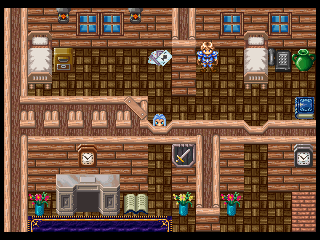
- Layer A is drawn flat in slot 2. Layer B parts go by their tile attribute: plain parts flat in slot 3, "front" parts (0x10) with the characters of their own row, so they cover anyone standing on that row or above (the top of a tree, a door, a counter), and "top" parts (0x20) in slot 0x206, over every sprite (roofs, light shafts).
- Sprites are sorted by row: an object part without the front flag goes under every character, and a character's slot is 0x105 + its row's screen y + 16. Within one slot the last primitive added is drawn first, so the event characters end up under the party, and both under the front parts.
- The tone of Change Color modulates the map, and separately the objects, the event characters and the party, each switched by a bit.
- Passability is built once per map into a 65 × 65 byte grid from the same attributes: bit 7 blocks, bit 6 on a layer-B part opens (a bridge), bit 3 draws semi-transparent, bit 2 marks the part of an object that triggers its event. The world map has no tile passability at all: the party moves along paths between towns (Dungeon Edit, Field Edit).
Palette cycling#
Water, lava, fire, torches and lights move by rotating runs of colours inside 16-colour palette rows in video memory. Three tasks do it: one for the common objects (started at the first dungeon of a session and never restarted, so its phase depends on how long you've played), one for the map set and one for the wallpaper (both restarted at every arrival). A cycle is a five-byte record: the palette row, the period in vertical blanks, the direction, the first colour and the count. Each frame a cycle adds the vertical blanks since the last frame (at most 10) and rotates its run once when the sum reaches the period. All shipped cycles rotate the same way; two other modes, stepping through stored palettes and ping-pong, have their code but nothing uses them (Hidden and unused).
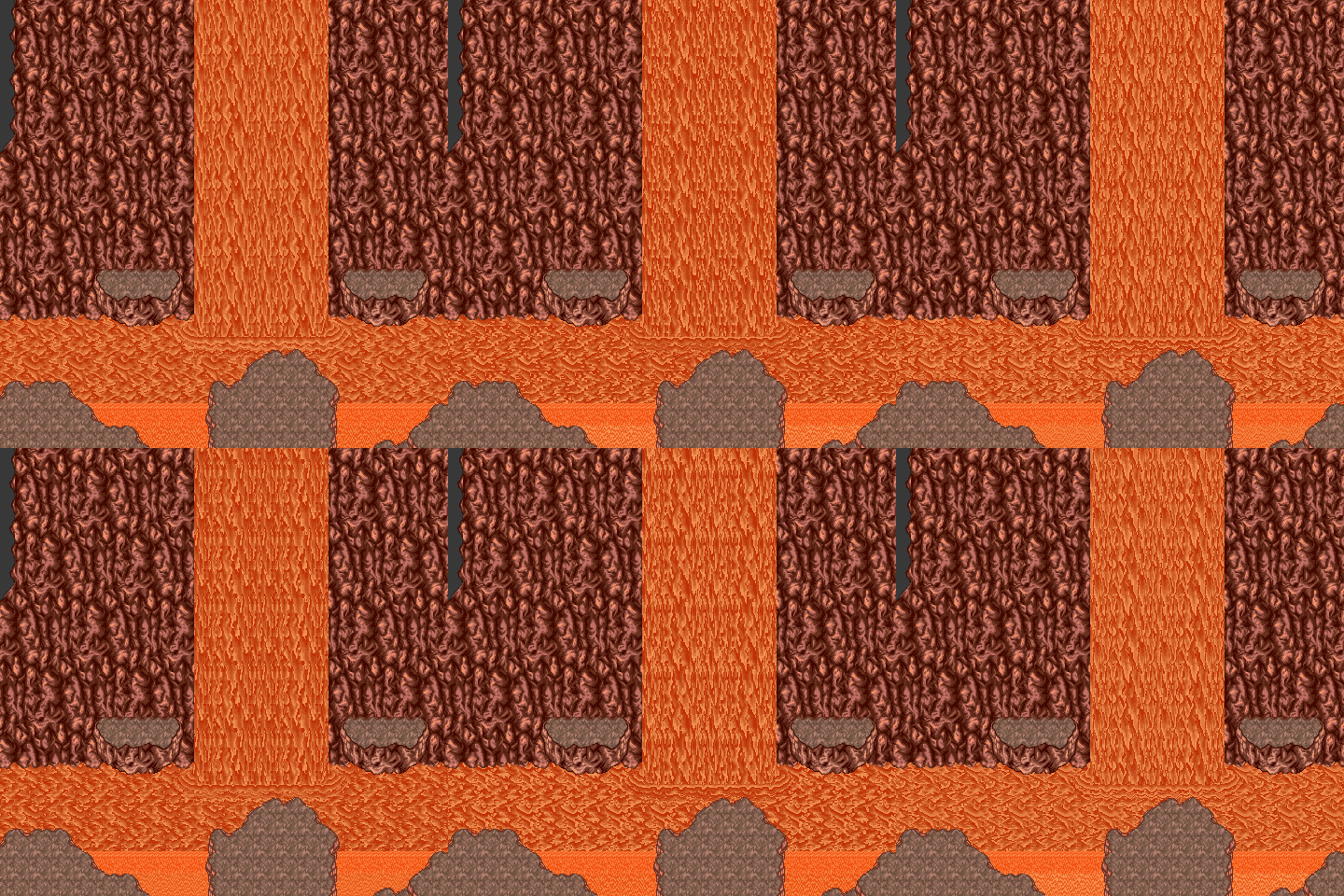
Nothing cycles on the world map. More on the sets that cycle: Map sets and tiles.
Screen fades#
Every map change, the Inn, Save Points, Display Title, Next Scenario, the Ending and the return from battle use one fade task with eight types. Types 0 and 1 fade in from black or white by drawing a subtract or add tile over the normal frame. Types 2 to 7 fade out over a copy of the previous frame: while they run, the field draws nothing new. Move Location's method picks the type: Black and White are plain fades, Black Melt and White Melt melt the picture away; each takes about 80 frames, and after the map loads it fades in from black (or from white, after White and White Melt) over 80 more. A fade asked for while another runs is ignored.
The fade counts vertical blanks (up to four at a time), not frames, so a slow frame doesn't slow it. The two jitter types that no method in the editor reaches, and the crash past them, are on Hidden and unused.
The text engine#
Event text is one byte a character, with no control codes: 0x20–0x7E are ASCII, a handful of codes from 0xA1 to 0xDF are symbols (♂ ♀, the heart ♡ at 0xA3, arrows, boxes and button marks, the tall N the editor puts in its default names), and the rest print placeholders.
- The font is one 256 × 240 page (COMDATA 2A9) at (512, 256) with eight colour rows. Each 4-bit pixel holds two 2-bit fonts: the main 8 × 12 font and a thin one that only the battle's party windows use. The top rows also hold a small 8 × 8 font for the editors.
- Most text goes through a grid of 80 × 60 cells of 4 × 4 pixels; a character takes 2 × 3 cells, and a new line moves down 4 rows. The grid turns its runs of cells back into sprites every frame, opaque and unshaded, so text shows its palette's colours exactly.
- Windows are a semi-transparent black and a shaded gradient under a bevelled border of grey lines, and open and close by scaling over ten steps.
- The typewriter that prints a message has seven modes. Only one, single bytes in the 8 × 12 font, is used. The other six are the Japanese original's text engine, two bytes a character in Shift-JIS, kept whole except for the glyph lookup (Hidden and unused).
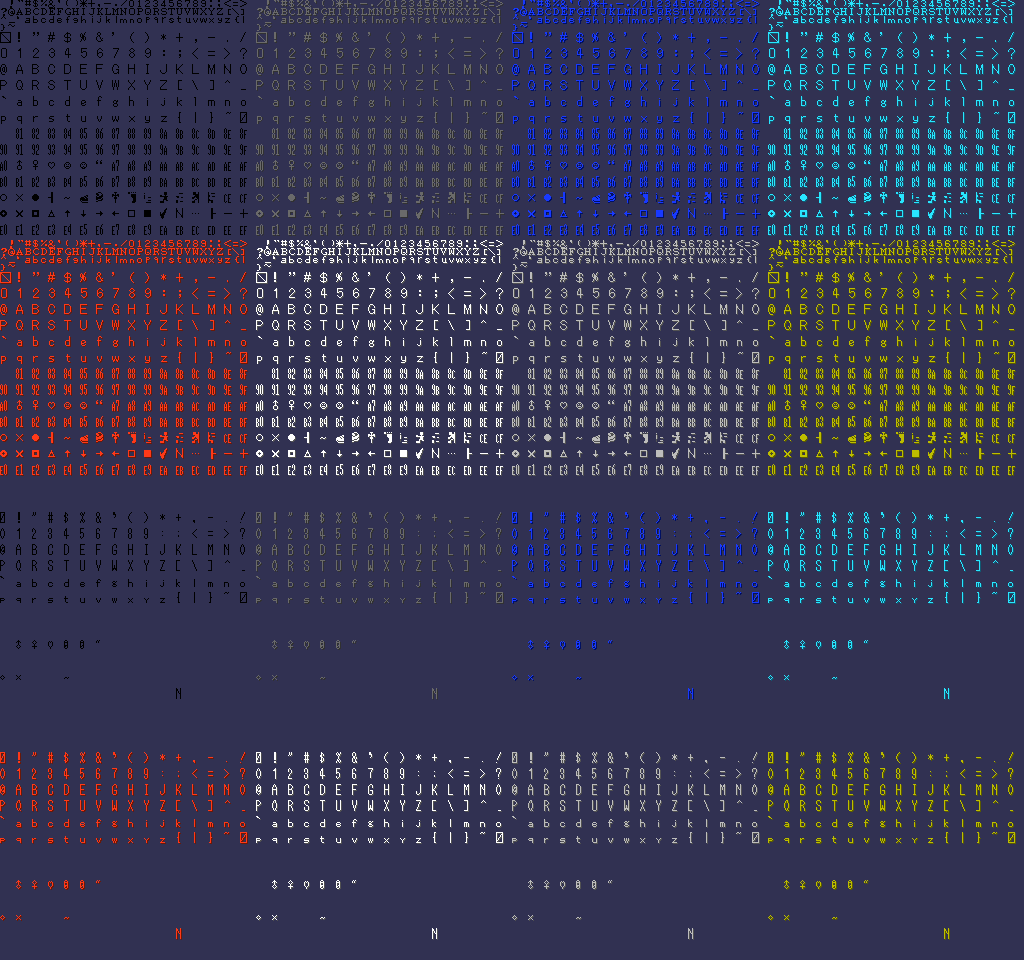
How each message type looks is on Events.
The sound driver#
Everything below the game's own sound code is Sony's library, libsnd, and the console's sound chip (the SPU).
- SOUND0.BIN: entries 0 and 1 are VAB 0, the system bank (the 78 sound effects and the jingles' instruments); entry 2 is the SEP that holds the 5 jingles; entries 3 and 4 are a General-MIDI-like bank of 105 instruments that nothing plays (Hidden and unused); 5–109 are the 35 songs, three entries each: the instrument bank's header, its samples and the sequence.
- The sequencer ticks 90 times a second, from a hardware timer, not from the vertical blank. Every song has a resolution of 480, so a track advances about bpm × 8 ÷ 9 tenth-ticks a tick. All 35 songs loop by markers; the jingles play once.
- Changing the song: the old one fades over two seconds, but is stopped as soon as the CD reaches the new song's bank. The bank's samples stream into sound RAM through a ring buffer, then the sequence is read and started. A song whose bank and sequence are still loaded starts at once.
- 24 voices are shared by the music and the sound effects. A new note takes a free voice, or the quietest, oldest one of no higher priority. Music volumes are squared; sound effects aren't, and play without reverb. The reverb is HALL at depth 35.
- A sound effect is keyed in the vertical-blank interrupt, so at most one starts per frame, and if two are asked for in the same frame the later one wins.
The songs, jingles and sounds themselves, with players: Music and sound.
The random numbers#
RPG Maker has one source of chance: the BIOS rand(), a linear congruential generator.
- seed = seed × 0x41C64E6D + 0x3039;
rand()= (seed ÷ 65,536) AND 0x7FFF, a number from 0 to 32,767;- a roll of N (0 to N − 1) is
rand()× N ÷ 32,768.
The seed is set to 1 once, when the program starts, and never again. Everything draws from the same stream: battles (turn order, hits, criticals, damage spread, the monsters' AI, which draws numbers even while it only weighs its options), random encounters, the Probability choices, Random movement, the Swing Screen, the jitter fade (1,248 draws a frame) and even the field menu's windows, which take three draws each as they fly in or out. So from power-on, the same buttons on the same frames play the same game: that is how the project replayed whole playthroughs in the emulator and compared them frame by frame. It also means a skipped animation can change the next battle. The odds themselves are on How battles work.
How the study checked all this#
Three kinds of evidence, from the weakest to the strongest:
- Static: read from the program's code and data, in a disassembler (Ghidra).
- Corpus: checked against Arc Arath and the community's archive of about 180 fan games on memory cards.
- Emulator: compared pixel by pixel or state by state with the PCSX-Redux emulator running the real disc, driven by scripts that press buttons, log every call of interest, and pause on exact frames to save RAM and video memory.
| Part | How it was checked | Result |
|---|---|---|
| Disc, executables, overlays, modes and tasks | static, with traces in the emulator | the update order of a frame logged task by task |
| Card files and the word-LZ compression | corpus and emulator | all 462 distinct System and Scenario saves of the fan archive, 99 player saves and 773 Anime Maker saves rebuilt byte for byte; cards written by the project's tools loaded and played by the game |
| Event bytecode | corpus and emulator | 14,853 pages of 8,269 events in 985 maps parse exactly; every command's length in frames measured |
| The field renderer | emulator | 57 snapshot captures and 31 live frames equal to the console's, pixel for pixel |
| Palette cycling | emulator | 30,770 rotations and resets replayed, 0 mismatches |
| Screen fades | emulator | 76 frames of all 8 types: 72 exact, 4 differ only under a message window |
| Text and windows | emulator | whole frame sequences exact |
| Sound | emulator | 265,936 sound-chip register writes over 28,287 ticks replayed, 0 mismatches |
| Battles and the random numbers | emulator | 1,362 decisions of 9 logged battles replayed from the logged random numbers, 0 mismatches |
| The editors | emulator | 1,427 editor screens captured; every write checked byte for byte against a model |
| Hidden features | static, then patched runs | a scan of every reference in every program image, each find run in the emulator where it could be |
The models the project wrote (of the renderer, the fades, the text, the sound driver, the battle engine, each editor) are judged only by their output: they pass when they draw, play or write exactly what the console does, on every frame tried. How the study was done, and by whom in outline, is on Behind the scenes.